Deep dive into the Entra Connect Sync API
This post explores the undocumented Microsoft Entra Connect Sync API and the security implications for synchronised Entra ID environments

Written by:

TL;DR
In this blog post, I explore the Microsoft Entra Connect Sync API’s capabilities, in an attempt to increase awareness and document this critical component used in hybrid environments. The information in this post can be used to help outline the attack surface of Active Directory-Entra ID synchronised environments.
This article describes:
- The general structure of the calls towards the Sync API
- A list of available Sync API Actions
- The DirSyncFeatures
- How to use the Sync API to establish post-exploitation persistence
- Best practices for securing your hybrid environment
Target audience: Active Directory and Microsoft Entra ID administrators, offensive security practitioners, detection engineers, security researchers.
Technical level: High
Introduction
Given the increased adoption of hybrid infrastructures that integrate on-premise and cloud environments across various organisations, I've become interested in investigating Microsoft's undocumented API used by the Microsoft Entra Connect Sync engine to carry out hybrid synchronisation actions.
I started this research with a specific question in mind:
If a threat actor has compromised the on-premise Active Directory environment of a hybrid configuration, what can the threat actor do towards the synchronised Entra ID tenant?
I found it surprisingly hard to answer this question in detail. A lot of undocumented components are involved in the synchronisation process, and Microsoft has made several changes to them over time, making it hard to understand what is possible at this point in time.
Significant research has previously been done in this area and a lot of great content and tools are available out there. A special mention goes to Dr. Nestori Syynimaa and his AADInternals tool, which has greatly helped me approach and use the API.
This blog post examines what an attacker can do in Entra ID after compromising an on-premises Active Directory environment. It does not address the reverse path, i.e. targeting on-prem Active Directory after compromising Entra ID.
On-premises synchronised vs cloud-only identities
In Entra ID, identities such as User Principals, Groups and Devices can either be "cloud-only" or "on-premises synchronised". For users, the onPremisesSyncEnabled attribute indicates if the identity is synchronised:
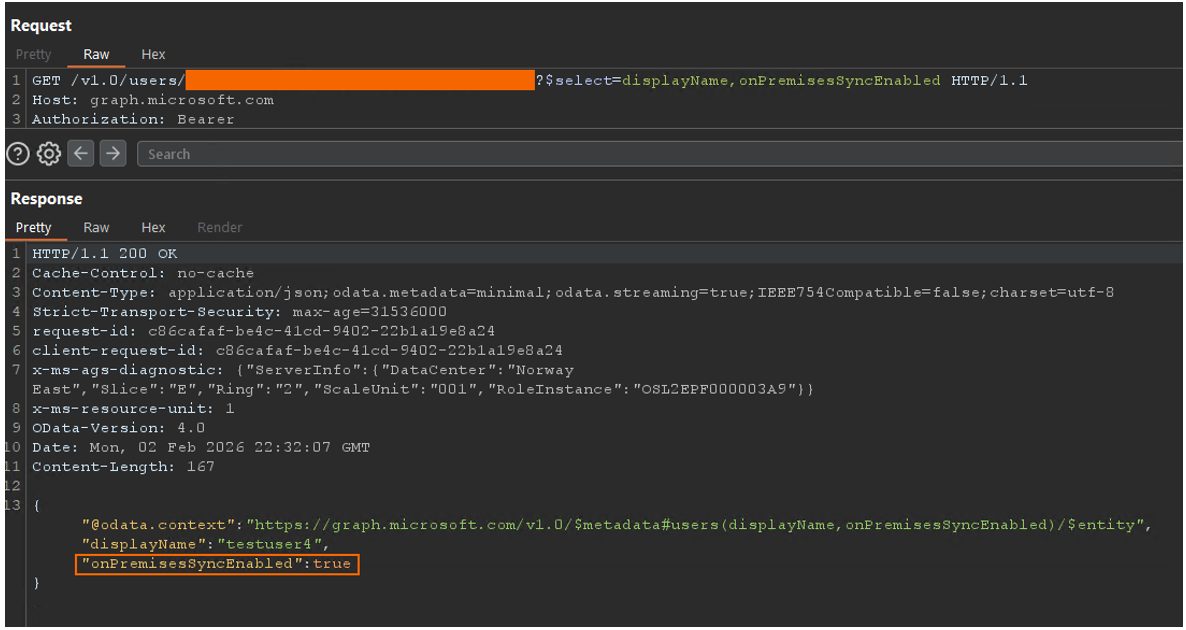
Generally, Entra Connect Sync is only able to carry out modifications for identities synchronised on-premises; it cannot modify or read cloud-only identities (with the exception of Soft and Hard Matching). As such, everything described in this post only applies to synchronised identities.
The Sync API
To carry out synchronisation actions, Microsoft Entra Connect Sync uses a publicly available API located at https://adminwebservice.microsoftonline.com/provisioningservice.svc. This is the API I refer to as Sync API, and has been the main focus of my research. This API's identity is represented in Entra ID by the Microsoft Entra AD Synchronization Service Service Principal (or Enterprise Application), with the Application ID of 6bf85cfa-ac8a-4be5-b5de-425a0d0dc016.
Until last year, Entra Connect has used a User Principal named following the convention Sync_<ServerHostname>_<HexString> to carry out synchronisation tasks. I will refer to this identity as the Sync User Principal.
Starting mid-2025, Microsoft has updated the Entra Connect engine to use Application Based Authentication (an App Registration/Service Principal) instead, which follows the naming convention: ConnectSyncProvisioning_<ServerHostname>_<HexString>. I will refer to this identity as the Sync Service Principal.
User or Service Principals in the tenant are able to use the Sync API only if granted the necessary permissions. In particular, User Principals need the Directory Synchronization Accounts Entra ID role, while Service Principals need the ADSynchronization.ReadWrite.All permission.

I will refer to an identity with any of these permissions as a Sync Principal.
I did not find any granularity in permissions towards the Sync API, meaning that a Principal can either be granted access to all Sync API functionalities, or to none.
The Sync API communicates over HTTP using the Windows Communication Foundation (WCF) framework. This is a partially serialised protocol, which looks like this when proxied:

Using mitmproxy, I deserialised the traffic while intercepting it. WCF uses SOAP XML, which results in requests having the following general structure:

I have omitted some less-interesting elements. Elements to take note of are:
- Action: Defines the type of action we are requesting the Sync API to perform.
- ApplicationId: UUID that indicates which version of the Sync API to use, or at least that's my guess. I did not notice any differences when modifying this value, and I only found two values that were accepted:
- 1651564e-7ce4-4d99-88be-0a65050d8dc3
- 6eb59a73-39b2-4c23-a70f-e2e3ce8965b1
- BearerToken: The access token used by the Sync API to authenticate the Sync Principal. It needs to contain the Sync API as audience: 6bf85cfa-ac8a-4be5-b5de-425a0d0dc016. In my testing I could not use tokens with Graph API (or any other) audience in requests to the Sync API.
- Body: The elements in the body depend on the Action specified in the envelope's header.
Available Sync API Actions
The available Sync API Actions answer the question "What can a threat actor who has compromised a Sync Principal do?". Since I could not find any publicly available documentation in this regard, I have compiled a list of Actions by intercepting Entra Connect traffic towards the Sync API, and by reverse engineering the Entra Connect server.
The following tables describe the Action name (the exact string to be included in the http://schemas.microsoft.com/online/aws/change/2010/01/IProvisioningWebService/<ACTION_HERE> URL), and a short description based on my experience and judgement. The Actions marked with (AADInt) are implemented and available, to varying degrees, in AADInternals.
|
Action |
Description |
|
Capabilities (AADInt) |
Returns information regarding provisioning service capabilities and supported versions. |
|
GetCompanyConfiguration (AADInt) |
Returns comprehensive information regarding the synchronisation configuration of the tenant. |
|
GetDeviceConfiguration (AADInt) |
Returns the cloud’s public certificate as an element named CloudPublicIssuerCertificates, used by AD. |
|
GetKerberosDomainSyncConfig (AADInt) |
Returns info used by Cloud Kerberos Trust. |
|
GetServiceAccount (AADInt) |
Creates a new Sync User Principal, or changes the password of an existing one. Takes the user's identifier as input (first part of the UPN, before the tenant's domain), and returns the new user's cleartext password. |
|
GetServiceAccountUpnForForeignCompany |
Returns the Application ID of the Sync Service Principal used for syncing. |
|
GetSingleObject |
Similar to ReadBackAzureADSyncObjects2, but it only returns information for a single object. |
|
GetWindowsCredentialsSyncConfig (AADInt) |
Returns config information about accepted types of Windows credentials. |
|
ReadBack |
Similar to ReadBackAzureADSyncObjects and ReadBackAzureADSyncObjects2, with some differences in the XML structure. |
|
ReadBackAzureADSyncObjects (AADInt) |
Same as ReadBackAzureADSyncObjects2 as far as I can tell. |
|
ReadBackAzureADSyncObjects2 (AADInt) |
Returns information about synchronised objects in the tenant, such as users, groups and devices. Used by the sync engine to compare object states between cloud and on-prem. |
|
Action |
Description |
|
DeleteServiceAccount |
Deletes a Sync User Principal previously created with GetServiceAccount. |
|
FinalizeExport (AADInt) |
Action called by the sync engine at the end of a Full or Delta Sync. Sends information regarding the number of objects exported successfully and other synchronisation metadata. |
|
Provision |
Similar to ProvisionAzureADSyncObjects2. |
|
ProvisionAzureADSyncObjects (AADInt) |
Same as ProvisionAzureADSyncObjects2 as far as I can tell. |
|
ProvisionAzureADSyncObjects2 (AADInt) |
Adds objects to the cloud environment, such as users, groups or devices. It allows you to define most of the object's attributes. The objects created this way are automatically marked as synced on-prem. |
|
ProvisionCredentials (AADInt) |
Changes the password of a cloud user synced on-prem (Password Hash Synchronization). |
|
ProvisionExtensionAttributes |
Provisions extension attributes to extend the schema of attributes of cloud objects. |
|
RegisterApplicationAuthentication |
Creates a Sync Service Principal or resets an existing one's certificate. Takes as input the certificate to be used for authentication (together with other fields), and returns the new App ID. |
|
SetCompanyDirsyncFeatures (AADInt) |
Changes Directory Synchronisation features. |
|
UpdateDirSyncConfiguration |
Can be used to change directory synchronisation options saved in the cloud, such as the Entra Connect client version, the Entra Application version, “current export” metadata, sync client machine name, and others. |
|
Action |
Description |
|
SetDeviceConfiguration |
Despite its name, I could not use it to change the certificates read with GetDeviceConfiguration. |
|
GetMonitoringTenantCertificate (AADInt) |
Used to return a cert used for health/log monitoring, currently deprecated with an empty response. |
|
DisableLogMonitoring |
Should disable health and log monitoring, unsure if it actually works. Returns an empty response. |
|
GetKerberosDomain (AADInt) |
Could not make this Action work, and Entra Connect does not use it. Potentially outdated. |
The DirSyncFeatures
Microsoft stores several flags related to synchronisation features in Entra ID, which can be fetched or modified using the Graph API. I found that these synchronisation features are also accessible from the Sync API. The current configuration can be read using the GetCompanyConfiguration action, which returns, among others, the following value labeled DirSyncFeatures:
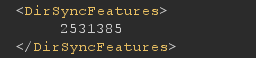
While it can look like a random number at first, this is the decimal representation of a binary array of (at least) 22 bits, each representing a flag. I tested and mapped these values against the synchronisation features fetched from Graph API.
|
Bit # |
Feature |
|
00 |
passwordSyncEnabled |
|
01 |
passwordWritebackEnabled |
|
02 |
directoryExtensionsEnabled |
|
03 |
quarantineUponUpnConflictEnabled |
|
04 |
quarantineUponProxyAddressesConflictEnabled |
|
05 |
softMatchOnUpnEnabled |
|
06 |
<UNKNOWN> |
|
07 |
<UNKNOWN> |
|
08 |
cloudPasswordPolicyForPasswordSyncedUsersEnabled |
|
09 |
fopeConflictResolutionEnabled |
|
10 |
unifiedGroupWritebackEnabled |
|
11 |
<UNKNOWN> |
|
12 |
deviceWritebackEnabled |
|
13 |
synchronizeUpnForManagedUsersEnabled |
|
14 |
userForcePasswordChangeOnLogonEnabled |
|
15 |
concurrentOrgIdProvisioningEnabled |
|
16 |
concurrentCredentialUpdateEnabled |
|
17 |
<UNKNOWN> |
|
18 |
groupWriteBackEnabled |
|
19 |
blockSoftMatchEnabled |
|
20 |
blockCloudObjectTakeoverThroughHardMatchEnabled |
|
21 |
bypassDirSyncOverridesEnabled |
I could not match the <UNKNOWN> flags to any documented feature during my testing. Feel free to reach out if you have any idea about what those could be.
Obtaining a Sync Principal's credentials
With the move to Application Based Authentication (the Sync Service Principal) as the default identity used for syncing in the cloud, there's been some discussion regarding credential dumping and being able to authenticate off-host, especially in cases where TPM is used to store the Sync Service Principal's private key. Daniel Heinsen has published a great blog post on this topic, where he showcases how to add an extra certificate to the Sync Service Principal's identity.
However, the Sync API provides several other, arguably simpler, options for obtaining a Sync Principal's credentials, at least for the time being.
The GetServiceAccount Action
While the Entra Connect server might have moved to using a Sync Service Principal, this action still allows the creation of new Sync User Principals that are automatically granted the Directory Synchronisation Accounts Entra ID role. More specifically this action can be used to:
-
Create a new Sync User Principal where we can specify the user's identifier, i.e. the string in the User Principal Name (UPN) that comes before the "@tenantdomain.com".
-
Reset the password of an existing Sync User Principal, by specifying as the identifier of an existing Sync User Principal.
This Action returns a new randomly assigned 256 character password, in cleartext.
The ProvisionCredentials Action
As described earlier, ProvisionCredentials is used to reset passwords of synchronised users. By default, the GetServiceAccount Action creates Sync User Principals as on-prem synced users.
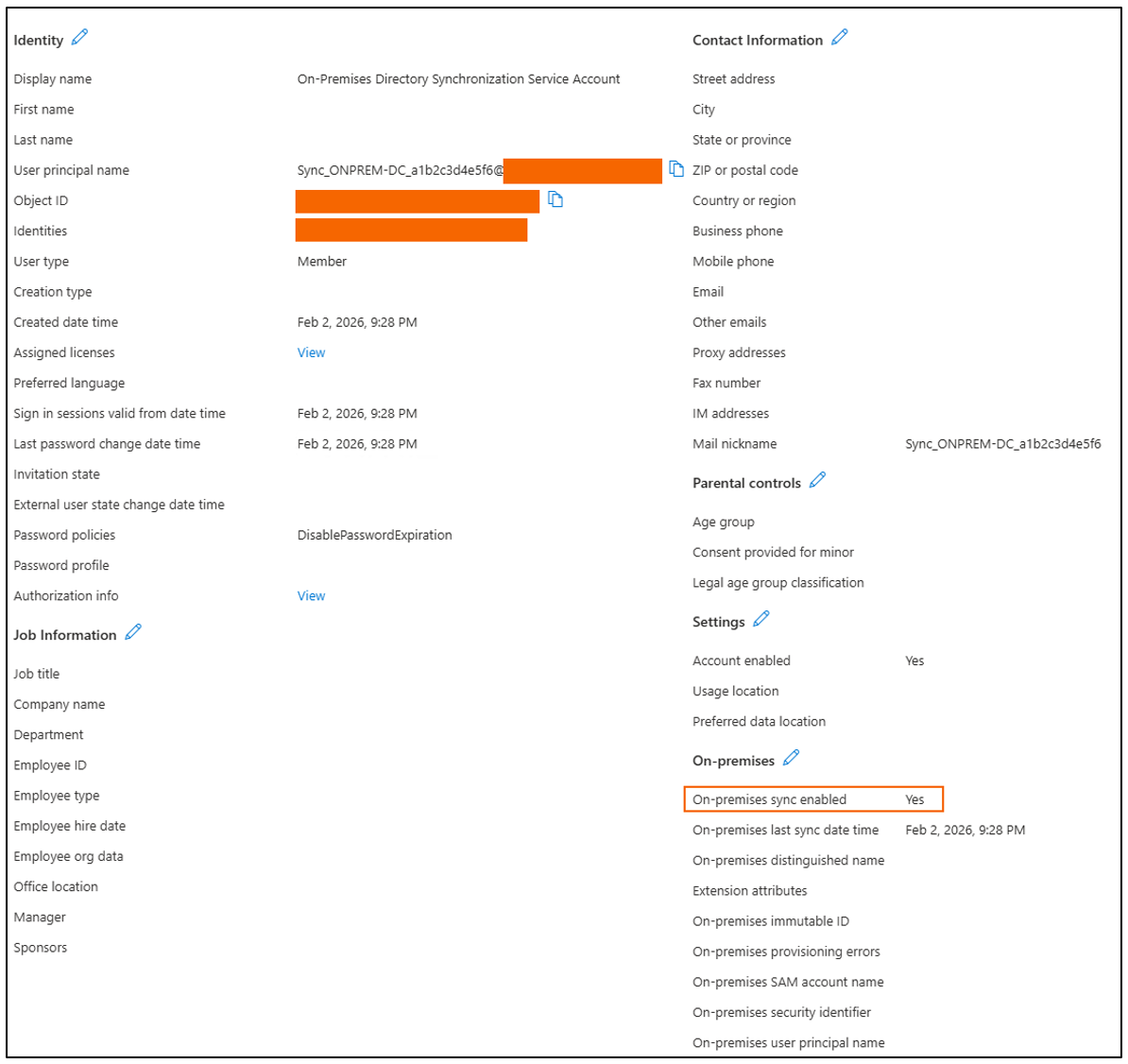
Because of this, we can use ProvisionCredentials to reset the passwords of existing Sync User Principals, and to effectively take them over.
The RegisterApplicationAuthentication Action
The RegisterApplicationAuthentication Action is relatively new, and it allows to:
- Provision a new Sync Service Principal (App Registration) with a certificate we control.
- Reset the certificate of an existing Sync Service Principal.
I have found, however, some restrictions on how this Action can be used:
- A Sync User Principal bearer token is needed. A Sync Service Principal bearer token is not accepted by this Action. This is the first and only occurrence I came across where values in the bearer token influenced the Action's behavior. In all other cases, a valid bearer token was a complete green light for using the Sync API Actions and their features.
- A Sync User Principal can only create or modify the certificate of one specific Sync Service Principal, which is somehow tied to the Sync User Principal. I was not able to find exactly how this link is implemented, but it seems to require their names to be matching at least.
Putting all of this together, and assuming a freshly compromised Entra Connect server using a Sync Service Principal, an attacker would be able to reset its certificate in the following way:
- Obtain the Sync Service Principal’s bearer token towards the Sync API (dump it from memory, intercept the traffic, use the certificate store).
- Use GetServiceAccount to create a Sync User Principal matching the Sync Service Principal's name.
- Use the newly obtained username and password to get a bearer token towards the Sync API.
- Use RegisterApplicationAuthentication with the Sync User Principal's bearer token to reset the Sync Service Principal's certificate.
- (Optional) Delete the Sync User Principal previously created with DeleteServiceAccount to clean-up.
Note that this will break the synchronisation service in the server, since Entra Connect Sync won't have the updated certificate and won't be able to request new access tokens.
I assume Microsoft's future plans are to completely transition to only supporting Application Based Authentication, and they will disable Sync API Actions such as GetServiceAccount and DeleteServiceAccount, making it significantly harder to compromise the Sync Service Principal's certificate in TPM-enabled devices. Until then, obtaining credentials for a Sync Principal using the Sync API will remain trivial.
Source of Authority (SOA) - Hardening of cloud-only users
Up until recently, given a user synced on-prem, there were no direct ways of converting this user to be cloud-only. Microsoft has now implemented the ability to convert the "Source of Authority" of a user, which effectively turns an on-prem synced user into a cloud-only, or Cloud Managed, user. This can be done using this Graph API endpoint.
I have attempted to use the Sync API to perform different Actions on Cloud Managed users and I was met with error messages such as: Unable to update password for a user that has another Source of Authority. For more information, see aka.ms/SOAerrors. It appears that this is an additional defense layer protecting cloud-only users from Sync API Actions, and I strongly encourage using this feature for highly privileged users that should remain cloud-only, such as your Global Administrators.
Securing Entra ID in hybrid infrastructures
To help protect Entra ID tenants from synced on-prem threat actors, I recommend implementing the following steps:
- Ensure Entra ID privileged users are cloud-only and not synchronised on-prem
- Convert your Entra ID privileged users' SOA to be Cloud Managed
- Enforce phishing-resistant MFA for all Entra ID privileged users
- Disable hard- and soft-matching
- Monitor and alert on creation/deletion of Sync Principals (User or Service), or unusual Sync Principal behavior
Conclusion
Over the past few years, Microsoft's hardening efforts have significantly reduced lateral movement capabilities from on-premise Active Directory towards Cloud Entra ID in hybrid infrastructures, which is definitely a step in the right direction.
However, a large number of critical components within their infrastructure remain undocumented while in plain sight, encouraging security by obscurity.
Since I believe that risk evaluation and management strongly rely on a deep understanding of the systems in scope, I hope the information in this post can be used to obtain better insight into the security posture of hybrid environments.
Get in touch
