A year of hacking SCCM, Part 2: Taking over SCCM and defending it
In Part 2, we demonstrate two authentication relay attacks and explain where defenders should start with hardening and detection.

Written by:

In Part 1 of this blog series, we shared how exposed credentials in System Center Configuration Manager (SCCM) environments led to privileged access during our security tests. In this second part, we explore the risks associated with SCCM server privileges through two further demonstrations, followed by practical recommendations for hardening and detection.
TL;DR
What we found
Exposed passwords were only one way SCCM led to privileged access during our tests. Authentication relay attacks also allowed us to gain administrative access to a site system and full control of an SCCM site. These findings show why SCCM server privileges and authentication controls deserve close attention.
Where to start
Map your SCCM server roles, their privileges and the systems they can reach. Review authentication relay protections, including SMB signing, LDAP signing and channel binding, and Extended Protection for Authentication where applicable. Restrict access to management services and monitor unexpected server authentication, changes to SCCM administrators and suspicious deployments.
Compromising SCCM through authentication relay
Access to plaintext credentials is fortunately (for us simulating threat actors) not the only viable path into SCCM. Two other attack categories from Misconfiguration Manager, ELEVATE and TAKEOVER, are feasible in almost every configuration we have seen. To understand those attacks, you need a small primer on a few attack concepts. These include how computer accounts work, authentication coercion and NTLM relaying. Then we will use all of it against SCCM in two attacks, resulting in full control of the site hierarchy.
A primer on modern identity attack concepts
You do not need to fully understand these concepts to follow the rest of this post. If you skip this part, all you need to accept is that authentication coercion and NTLM relaying give a threat actor a powerful way to take control of computers in most default domain configurations.
Concept: Computer accounts in Active Directory
Every Windows computer in a domain has its own account, called the computer account. In Active Directory you will find it as the computer's name with a dollar sign on the end. It works much like a regular user account: it has a password, and it authenticates to the domain controller over the network.
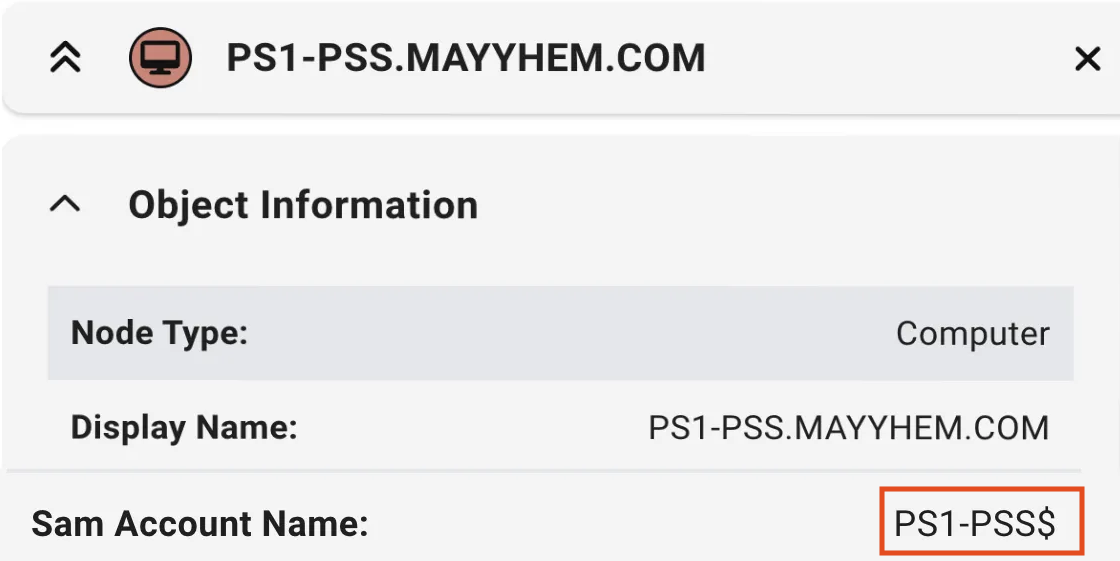
Penetration testers and threat actors care about computer accounts because that authentication is something they can steal and reuse. A computer account is an identity like any other, so if you can make a computer authenticate to you, you can use that authentication elsewhere. By default, a computer account has no privileges on other computers in the domain. Keep that in mind, because SCCM is the exception. Computer accounts are also the starting point for other attacks like Resource Based Constrained Delegation (RBCD) and Shadow Credentials, which are outside the scope of this post.
Concept: Authentication coercion
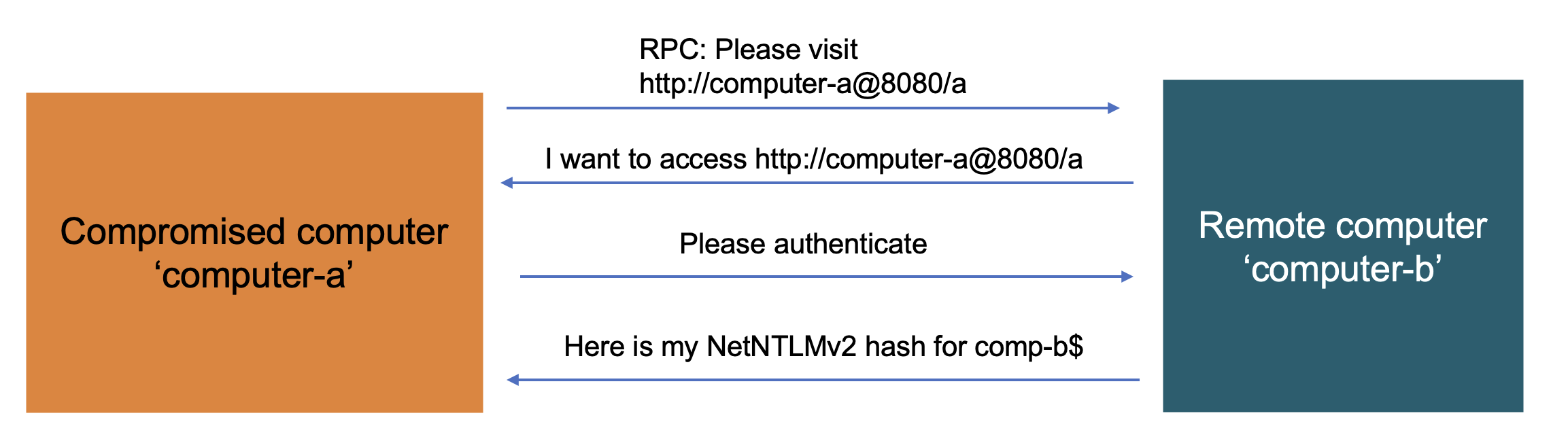
Authentication coercion attacks involve getting a target computer to authenticate to a computer you control on the network. You send the target computer a request over Windows RPC (Remote Procedure Call). That quietly forces it to authenticate back to the threat actor-controlled system with its computer account. You do not obtain the plaintext password of the computer account, but you do get credential material that is valid on the network: the NetNTLMv2 hash. That hash is not a password and cannot be used like one, but it can be relayed on the network.
Concept: NTLM relaying
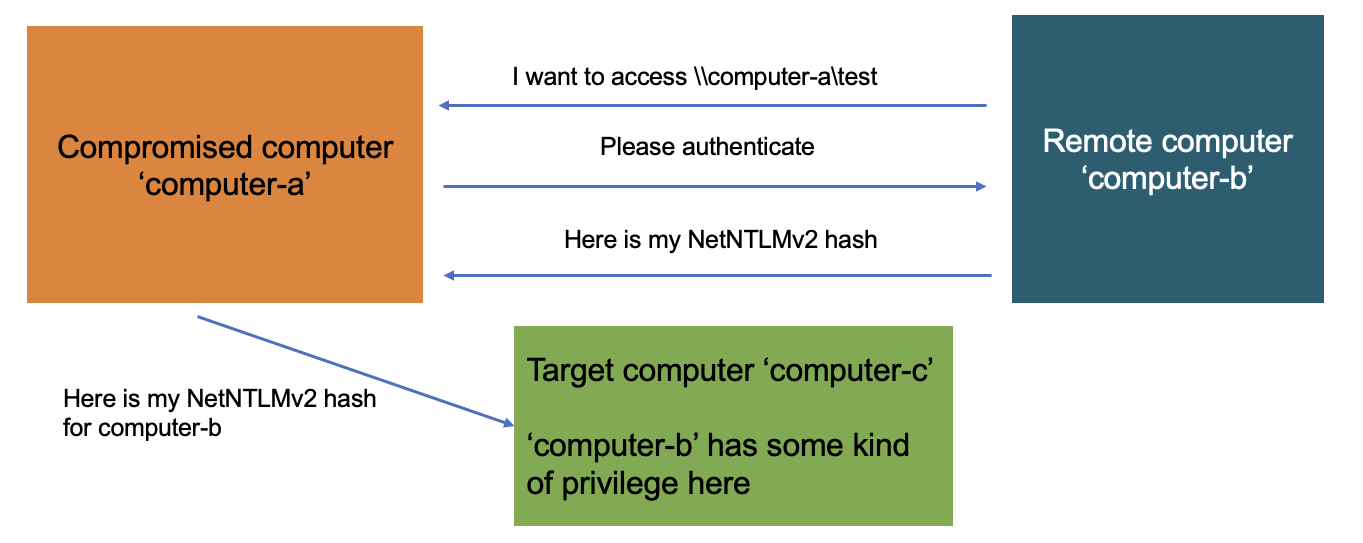
NTLM relaying involves taking network credentials you have obtained and using them to authenticate to another target. Computer B authenticates to your compromised Computer A, usually because you coerced it, and you use Computer A to relay that authentication to target Computer C. If the computer account of Computer B has privileges on Computer C, you can do anything Computer B can do against C. The relayed NetNTLMv2 hash is only valid inside this relaying process, which makes the attack somewhat fragile compared to having a plaintext password. However, it does not need to last long for you to successfully use it.
Tying the three concepts together in the context of SCCM
Combining computer accounts, authentication coercion and NTLM relaying gives us a powerful attack vector we can reuse across Windows systems. It looks like this:
- Control a computer on the network. In the diagram this is Computer A.
- Use Computer A to coerce authentication from Computer B.
- Use Computer A to relay the NetNTLMv2 hash from Computer B to Computer C.
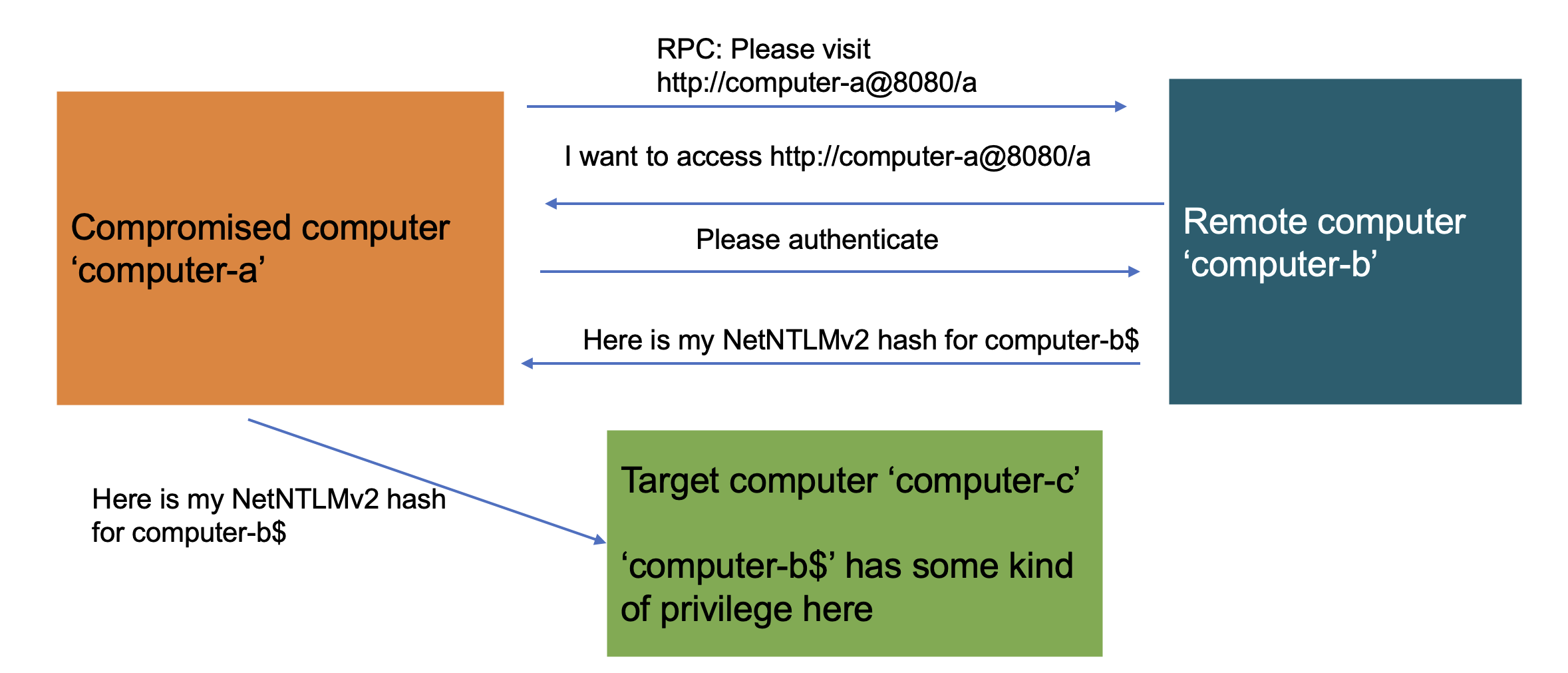
As I mentioned earlier, a computer account has no privileges on other computers in the domain, so this should not work at all. Usually, that is exactly right. So, what is the point?
This is where SCCM comes into the picture. The computer account of the primary site server is a member of the local Administrators group on every SCCM site system. As far as I know, no other Microsoft product does this by default, and it is what makes SCCM so vulnerable to the coerce and relay attack pattern above.
Remember that the primary site server is the body of SCCM. So, if you can make the site server authenticate to a computer you control, you can relay that authentication to another site system and do whatever a local administrator can do there. In a default Windows configuration that means everything: adding accounts to the local Administrators group, obtaining remote code execution, and anything else that follows from this type of access.
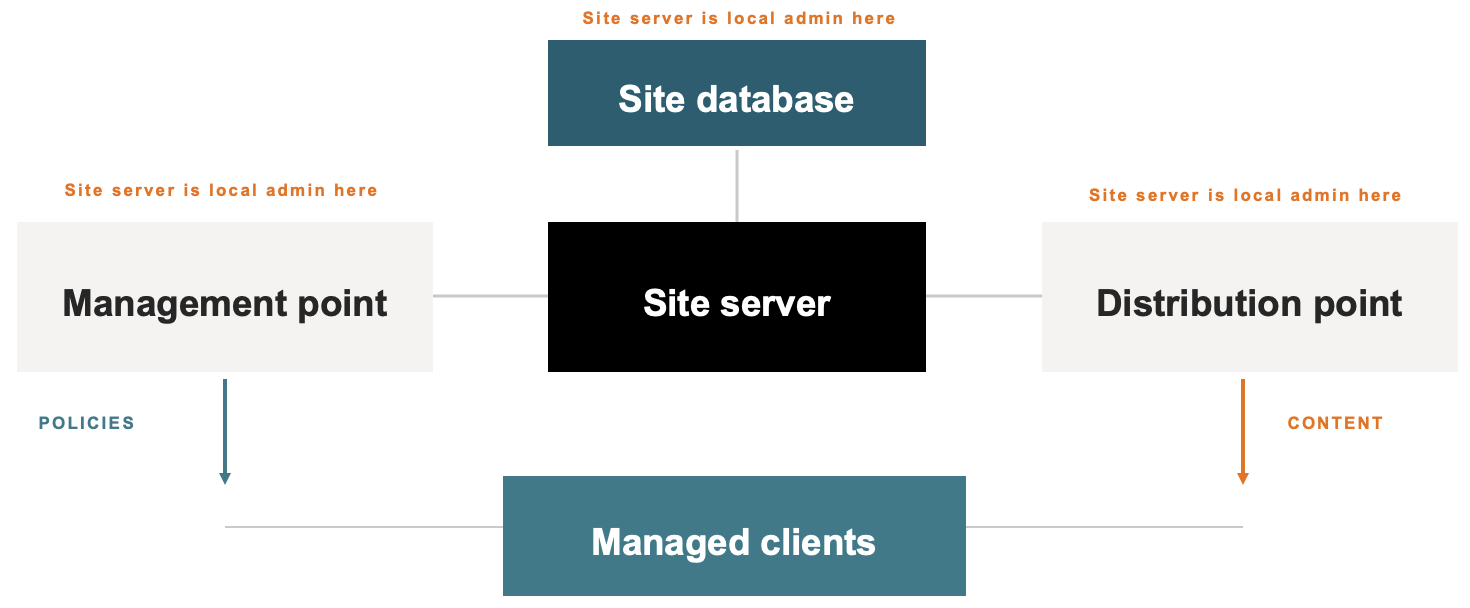
Demo 3: Take control of an SCCM site server (ELEVATE-1)
We are now going to tie the three concepts together with what we just learned about the site server, into one cohesive attack against SCCM infrastructure. Because it follows the coercion and relay pattern above, it only works if there are at least two SCCM servers in the environment.
- Access required: A regular domain user.
- What you obtain: Local Administrator privileges on an SCCM server.
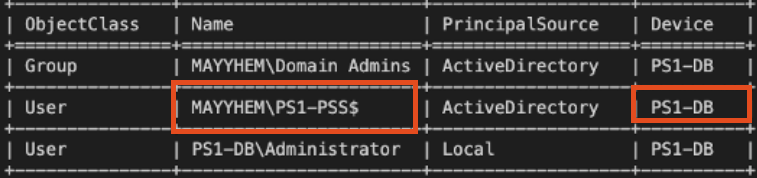
If we list the local Administrators group on PS1-DB, we can see that the computer account PS1-PSS$ is a member. PS1-PSS$ is the computer account for the site server, which is a different computer from the site system we are targeting. This is the crux of the issue, because as we have learned, it is possible to coerce and relay authentication from PS1-PSS. That is what enables a lot of the known ELEVATE and TAKEOVER attacks from Misconfiguration Manager.
Updating the earlier diagram with the primary site server (PS1-PSS) and the database server (PS1-DB) gives us this:
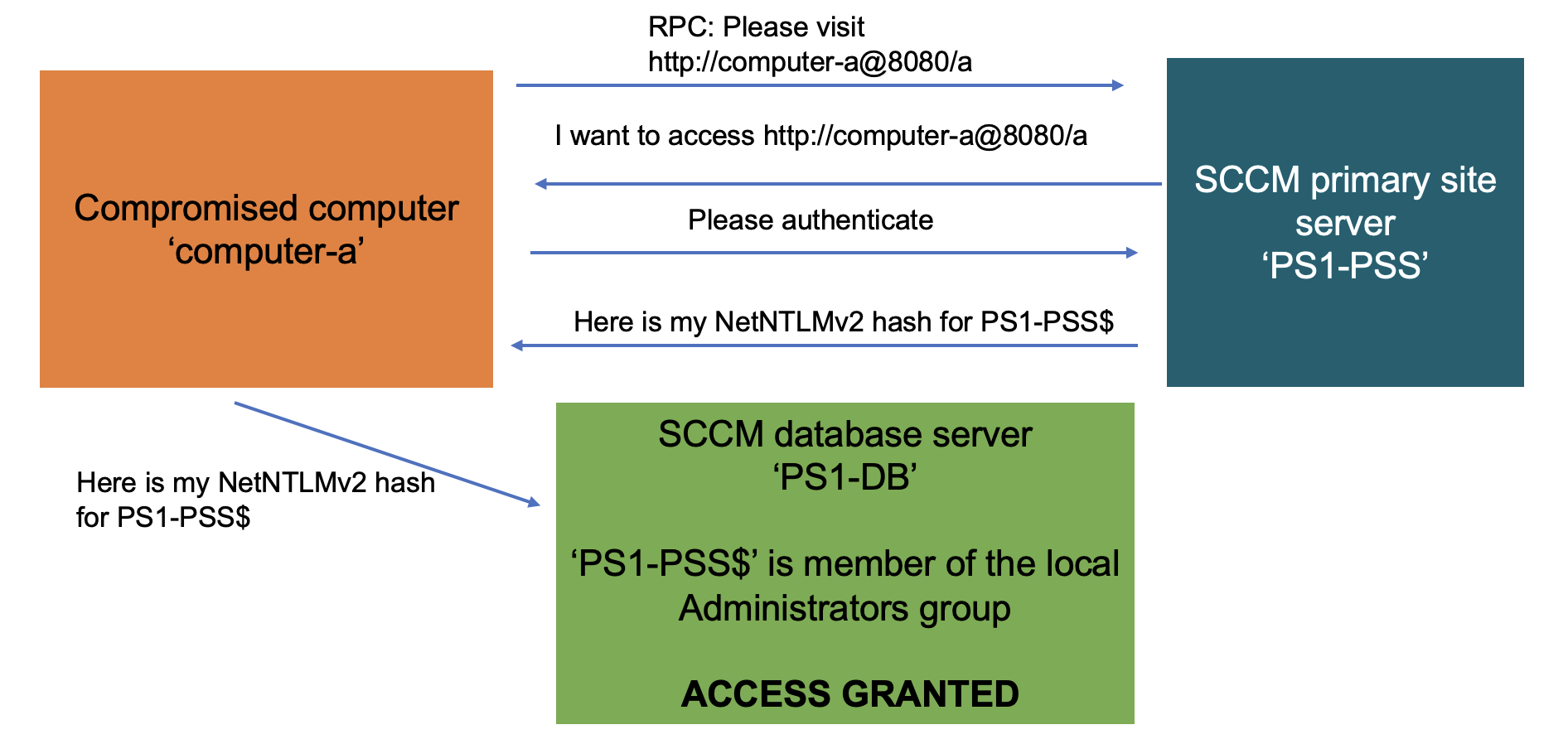
Performing ELEVATE-1 involves the following:
- Coerce authentication from the site server PS1-PSS.
- Relay that authentication, from the computer account PS1-PSS$, to PS1-DB over SMB.
- Use the authenticated SMB connection to dump PS1-DB’s password hashes from the local SAM (Security Account Manager) database.
Step 3 can be anything that requires Administrator privileges on PS1-DB. Dumping SAM is one option, and adding an account you control to the local Administrators group is another. Below is the SAM dump, which gives us the NTLM password hash for the local Administrator account. We can use that hash in place of the plaintext password, a technique known as pass-the-hash.
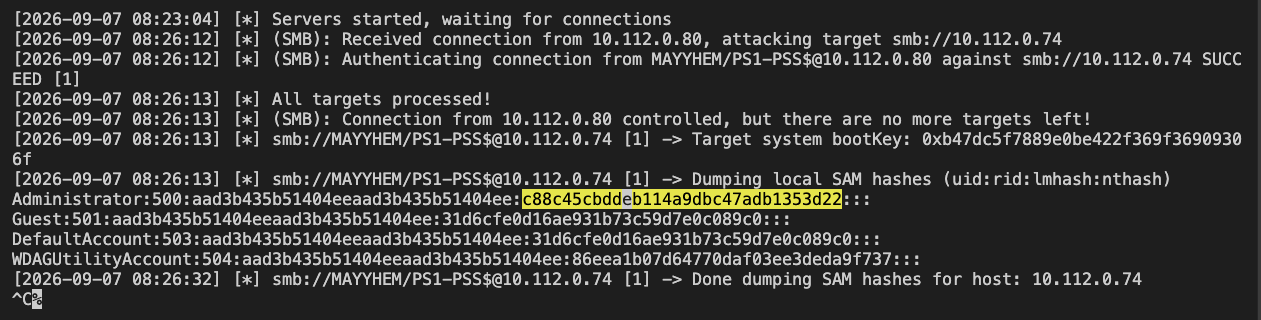
From there we can use the hash to get a shell over a protocol like WMI or SMB. That is remote code execution on the SCCM site database, one of the most important servers in the network, a few minutes after starting the test with only a regular domain user.

Demo 4: Full takeover of an SCCM site (TAKEOVER-1)
We are going to take the concepts used in ELEVATE-1 and extend them.
- Access required: A regular domain user.
- What you obtain: Full control over the SCCM hierarchy.
This attack follows the same pattern as ELEVATE-1, but instead of relaying the coerced authentication to SMB on the database server, we relay it to MSSQL. The property that makes this work is similar to what we saw before with the local Administrators group: the computer account of the primary site server is ‘db_owner’ of the SCCM database on the site database server. So, if we can make the primary site server authenticate to us, we can relay that authentication to the database and obtain full control of the entire SCCM site.
Performing TAKEOVER-1 involves the following:
- Coerce authentication from the site server PS1-PSS.
- Relay that authentication, from the computer account PS1-PSS$, to PS1-DB over MSSQL.
- Use the authenticated MSSQL connection to add an account we control to the Full Administrator role in the SCCM database.
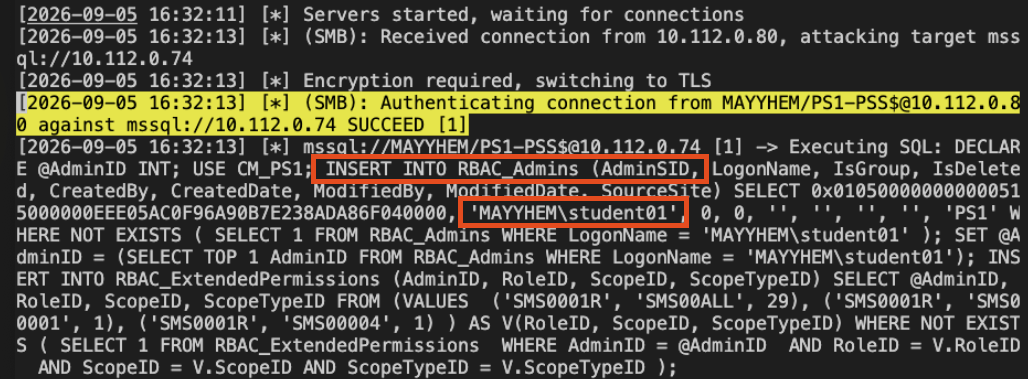
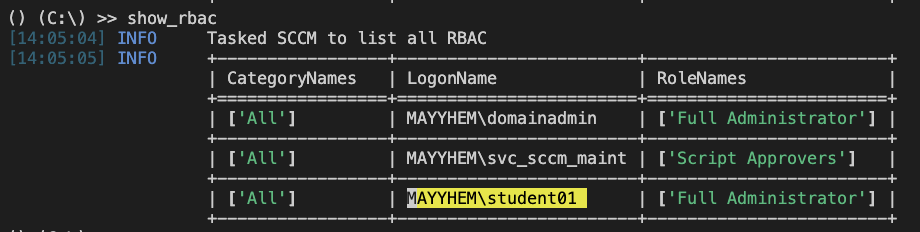
From there, we can log in to SCCM with administrative privileges using tools like sccmhunter. Listing the RBAC roles from the database shows the account we added with the Full Administrator role, which is effectively full control of the entire SCCM site.
Defending SCCM
Before we discuss defence strategies, we take a brief look at what makes SCCM so vulnerable, followed by a quick self-assessment to check whether your SCCM infrastructure is exposed.
Why is SCCM so vulnerable?
SCCM is used in most organisations we test, and typically only a few select individuals know how to operate it. This could sound like security by obscurity, but I would argue it is insecurity by complexity. The people who could fix the problems do not understand the system well enough to see them, and the people who understand the system are not the ones being told it is a security problem. That makes it hard to convey in a simple manner, how weak the default configuration is to people who neither know nor understand SCCM.
The reaction we get when we demonstrate these attacks says a lot. Clients ask how it can be this bad without anyone talking about it, whether they should have known, and how they managed to miss something this easy to exploit. They are not wrong to ask. The research has been public for years, but until someone shows you a domain compromise that started from a regular domain user, SCCM is still simply your trusted patching tool that has been running fine since the 2000s.
Replacing SCCM does not appear to be a viable solution either. We see organisations using Intune and Azure Arc more and more, but there are countless features in SCCM that neither of these two solutions have. A survey on Intune use by React made in 2026 lists the following statistics:
- 62% of respondents said they're managing devices with both Intune and ConfigMgr.
- 55% of those still using ConfigMgr said they have no plans or no timeline to retire it.
Organisations appear to be making progress with cloud-first management, but many are still working through the operational realities of managing hybrid environments. A lot of organisations need more flexibility and functionality than what Intune offers or is currently capable of. A good example is that Intune does not manage servers, which is a dealbreaker for the many organisations that use SCCM for both servers and workstations.
Fixing the issues that make SCCM vulnerable is also difficult. A lot of the problems stem from missing security controls in non-SCCM systems like Active Directory. You can add controls like the administrative tier model, Extended Protection for Authentication (EPA) on Active Directory Certificate Services (AD CS), SMB signing, LDAP signing and channel binding, and network segmentation, but each one of these controls is typically owned by a different team with its own priorities. Some of SCCM's security problems cannot be solved through configuration changes at all, and need a detection and response plan to mitigate. All of a sudden, a lot of people in the organisation need to understand SCCM and its vulnerabilities.
How to assess your SCCM exposure
These questions can help you identify where to investigate first. A ‘no’ or ‘I don’t know’ calls for a closer look at your configuration and the relevant attack paths.
Here is a rough self-assessment you can run from the perspective of both threat actor and defender. Every question is written so that a confident ‘yes’ means you are on the right track. Anything you cannot answer with a clear yes is something a threat actor can abuse, and that includes the ones you simply do not know the answer to.
- Is your SCCM infrastructure a single server, rather than a separate site and database server a threat actor can relay authentication between?
- Do you enforce LDAP signing, LDAPS channel binding, and EPA (Extended Protection for Authentication) for AD CS, MSSQL (Microsoft SQL Server) and HTTP services?
- Have you segmented all SCCM administrative services, like the PXE boot point and the AdminService API endpoints, on the network?
- Can you guarantee there are no exposed plaintext credentials anywhere in your SCCM infrastructure, including file shares, scripts and task sequences?
- Have you hardened your infrastructure against the relevant attacks out of the 34 documented in Misconfiguration Manager, and had that verified by a third party who understands them?
On the second question: if you do not know what any of that means, I do not blame you, but it almost certainly means the answer is no. I have not yet seen a single organisation implement all of them successfully.
If you answered no to any of the above, you are most likely vulnerable to at least some of the SCCM attacks. The next three questions are about impact, meaning how far a threat actor gets when they do exploit it:
- Do you keep your Tier 0 systems (domain controllers, AD FS, AD CS, Entra Connect, etc.) out of SCCM management?
- Do you keep systems that can reach your Tier 0 out of SCCM management?
- Do you prevent Tier 0 accounts from logging on to SCCM servers?
A ‘no’ to any of these could expose a path from SCCM into Tier 0, depending on the permissions and access involved. To make it sound slightly less scary, that is under the assumption that the threat actor already controls or can take control of:
- A device on your network where they can run code, for example an end-user workstation
- An Active Directory domain user account
Most mature organisations we work with take an assumed breach mindset and treat both of those as given. Neither is a high bar for a competent threat actor in the current threat landscape. In many of the environments we test, SCCM exposes attack paths with severe consequences.
How to harden SCCM against these attacks
Writing a concise hardening guide for SCCM is difficult, because so much depends on architecture and configuration. Microsoft does not publish a reference architecture or hardening guide for SCCM either. Our experience testing these attack paths can help defenders prioritise their work. What we propose here is a guide that prioritises security controls as a response to concrete attacks.
What follows is not a complete hardening guide. It is the order I would work through if someone handed me an SCCM environment and asked where to start, beginning with the changes that remove the easiest-to-exploit and highest-impact paths first:
- Segment SCCM site systems and restrict management protocols to the source networks that actually need them (PREVENT-20), which closes multiple relay and coercion paths at once.
- Restrict and protect PXE services. Network segmentation and setting a boot password prevent the CRED-1 attack demonstrated in Part 1 of this blog series.
- Review distribution point file shares for plaintext credentials, scripts, and backups that should not be exposed there. Check non-standard shares on SCCM for credentials.
- Enforce SMB signing on site systems (PREVENT-12) to prevent ELEVATE-1, one of the high-impact attacks demonstrated in this blog post.
- Require LDAP signing and LDAP channel binding on domain controllers (PREVENT-13), preventing some of the most severe NTLM relaying attacks.
- Require Extended Protection for Authentication on AD CS and the site database where it is supported (PREVENT-14).
- Review SCCM accounts, administrative roles, and anything with a path into Tier 0.
Many of these are not SCCM-specific configurations, and this makes the challenge of hardening SCCM difficult. Adding controls to SMB, LDAP, and AD CS can break those services or their integrations, particularly where legacy software and devices do not support them, so you need to properly coordinate and test these controls in your environment. Which controls apply to you depends on how your SCCM hierarchy and network actually look and how they are configured.
How to detect attacks against SCCM
Nearly every documented technique has at least one prevention control mapped to it, so most SCCM problems can be mitigated. However, those controls are not always feasible to implement. One client we worked with could not enable LDAP signing because of legacy software in their environment, and asked whether detection and response could work as a compensating control instead. It is a fair question, and worth taking seriously.
SpecterOps recently published a blog post on SCCM detection that goes into great detail about detecting specific attack techniques. Here I want to look at a few scenarios that line up with the attacks in this blog series:
- A threat actor controls the computer and account of a compromised SCCM administrator. They use RDP to log into the SCCM server and open the SCCM console, exactly as the administrator does. Can the defenders detect that, assuming the administrator does not notice anything themselves?
- The threat actor then creates a package to execute code on a specific computer in the environment. Can the defenders detect that?
- What telemetry does the organisation actually have when the threat actor uses SCCM to deploy an application against 1, 3, 10 and 100 endpoints, and can their detection tell those deployments apart from ordinary SCCM administration?
Much of what a threat actor does with SCCM is indistinguishable from real SCCM administration, so a defence strategy built only on detection, with no prevention, is unlikely to succeed. I told that client, with the LDAP signing problem, they had three options: figure out how to implement it once and for all, leave the security hole open for the next penetration tester or threat actor to find and exploit, or build detection and response robust enough that they could guarantee stopping the attack every time. It was a bit on the nose, but I believe they got the point.
That does not mean detection is worthless, but it has to be layered, with coverage at several points in the known attacks. I prioritised the list below by how many high-impact attacks each detection control addresses. Another approach is to map detections along a full attack chain, from recon to execution, so you have coverage at every stage rather than the broadest first. Either way, this is where I would start:
- Detect site server accounts authenticating from unexpected sources (DETECT-1). This gives broad coverage across the relay-based attacks TAKEOVER-1 through TAKEOVER-8.
- Detect additions to the local security group ‘SMS Admins’ (DETECT-5) or the ‘RBAC_Admins’ database table (DETECT-6), as both may indicate SCCM hierarchy takeover.
- Detect client push accounts authenticating from systems other than the primary site server (DETECT-3).
- Detect malicious or unauthorised SCCM application deployments through Audit Status Messages (DETECT-4).
- Detect access to PXE and OSD temporary content, including sensitive files under SMSTemp (DETECT-7).
- Detect remote registry enumeration of SCCM site system roles through the winreg named pipe (DETECT-8).
- Detect reconnaissance against the Active Directory System Management container (DETECT-2).
- Detect local enumeration of SCCM client logs and settings (DETECT-9).
Future work on SCCM
We are continuing to contribute findings from the field back into Misconfiguration Manager, such as our addition to CRED-6. We also contribute to other open-source tools for testing SCCM security, like sccmhunter, SharpSCCM, and ConfigManBearPig (yes, that is what it is called), and we publish some of our own, like PXEHacker. We plan to expand our technical demonstrations and defensive guidance.
We recently ran an internal SCCM hacking workshop, exploring attacks and defence in a lab environment. Getting hands-on with the attacks does more for the defensive mindset than reading about them, and it is something we would like to do more of with clients as well.
Now is a good time to start looking at SCCM. These two blog posts have demonstrated the impact and given you what you need to get started. We also touched briefly on detection strategies, which we consider important in general, but even more so for SCCM, where implementing all the right protective controls can be difficult.
Many organisations do not want to invest time and energy in learning a product they expect to retire, when the same effort could be spent on Intune or whatever else comes next. I still believe I have made the case that SCCM is not going away quickly, and that it will stay vulnerable for as long as organisations let it. If you administer or defend an SCCM environment, treat it as the high-impact attack path it actually is today, and harden it against the known weaknesses , even if you plan to replace it.
Questions about this blog post?

Want to learn more?
If you want to learn more about our Red Team and penetration testing offerings, please check out our Red Team page and Penetration Testing page, and contact us for an introduction. We also offer the SCCM workshop described above for clients, so get in touch if that sounds interesting to you.