A year of hacking SCCM, Part 1: Exposed credentials and short attack paths
In every test where we found SCCM, it became a central part of the attack path. Here is what a year of deliberately targeting it taught us, and where defenders should start.

Written by:

This first part of our blog series looks at exposed credentials and the short attack paths we found during System Center Configuration Manager (SCCM) security tests. The demonstrations are technical, but you can skip them and still follow the findings. Part 2 covers authentication relay attacks, hardening and detection.
TL;DR
What we found
In every test where we found SCCM, it became a central part of the attack path. Credentials exposed in deployment files and PXE boot configurations gave us access to privileged accounts. In some environments, these accounts provided a short path to domain control or systems that were supposed to be separate.
Where to start
Review who can access your SCCM distribution point shares and PXE boot infrastructure. Check deployment files for exposed credentials and review the privileges of accounts used for network access, client installation and domain joining. Assess which systems those accounts can access and whether that access is necessary.
Where it all started
In early 2025, during a TIBER test, I sent a message to a hacker friend on Discord. I was looking for ideas about things worth checking out in the early phases of a Red Team test, when we had just obtained a foothold but had not yet discovered anything.
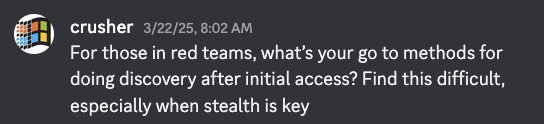
Not long after:

At this point in time, I barely knew what SCCM was. I had heard about attacks against it, but I had never properly dug into them. On top of that, I didn't get what the fuss was about. Why bother? Boring, archaic technology, and nothing about it sparked any immediate interest. Since then, I have heard the same from plenty of others.
When I bring up SCCM with penetration testers and defenders, most of them are uninterested, and I think there are good reasons for that. Nobody wants to touch SCCM. Who wants to risk breaking something you know is important but don't really understand? It runs on old sysadmin knowledge, and the people who have that knowledge are not the people writing about SCCM security today. It is easier to just leave it alone.
Once I got past the initial hesitation, I dove into one of the deepest rabbit holes I have ever seen. I worked through the SpecterOps talks and blog posts, found a lab someone had built that I could deploy myself, and discovered the Misconfiguration Manager project, which I come back to later. With the knowledge and the ability to test all the attacks in a safe lab environment, I was ready.
I then decided to try what I'd learned in real tests, and quickly discovered that ‘wow, this actually works!’ The techniques were easy to test and the impact was massive. Once I started looking, I saw SCCM everywhere. And whenever I found it, it gave me another attack path to whatever I was after, often leading me all the way to full control of the Active Directory domain.
Understanding SCCM
Before getting into the attacks, here is what SCCM is and how it works.
What is SCCM?
If you have never had the pleasure of getting acquainted with it, here is the short version. SCCM (System Center Configuration Manager) is Microsoft's endpoint management software. Organisations use it to deploy operating systems, applications, and patches to their Windows computers. That is the whole point of it: making changes on endpoints, at scale, from a single place.
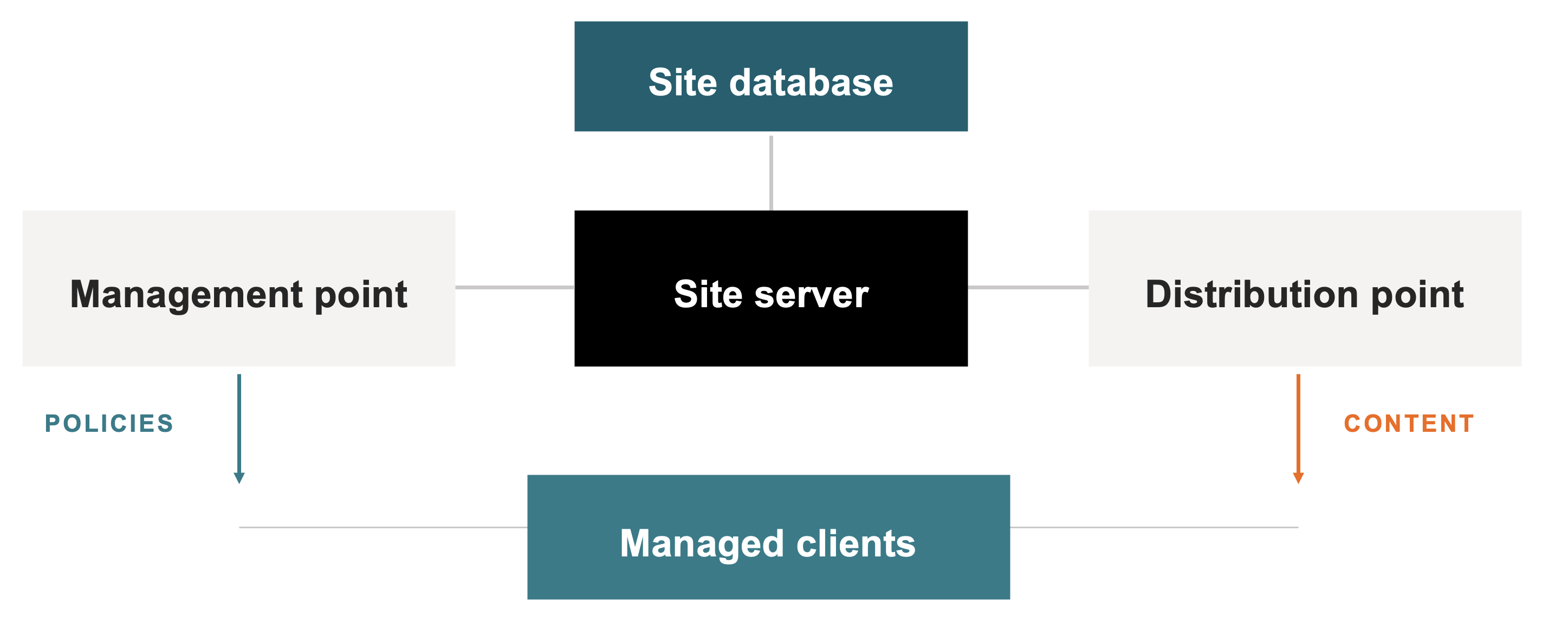
SCCM is a large beast with many roles. Only a few of them matter for the rest of this blog series:
- The site server is the body of SCCM. It installs and maintains everything needed to administer SCCM. Because SCCM is a hierarchy, where it is possible to have multiple sites, this server is often referred to as the ‘primary site server’
- The site database is the brain. It stores client policies (basically client configuration), certificates, and the role-based access control that decides who can do what in SCCM.
- The clients are the actual computers managed by SCCM. Each one runs an agent that talks to the SCCM server components and performs tasks like installing software.
- The management point tells clients what they should be doing.
- The distribution point hosts the files that clients download, typically on an SMB file share.
The diagram below shows the roles as individual boxes, but you will often have multiple roles on the same server. It is technically possible to run all the SCCM roles on a single server, and likewise you can run one server for each role. A common configuration we have seen in the organisations we have tested is having a site server (which also acts as a management point), and then the site database and a distribution point as separate servers.
SCCM is also normally configured with multiple privileged accounts, and those are usually what a threat actor is really after. At a minimum, you need to know about:
- The network access account (NAA). A legacy account, previously required to let a not-yet-domain-joined machine pull software from a distribution point.
- The client push account. Used to install the SCCM client agent, which makes it local admin on more or less every client.
- The domain join account. Used to join freshly imaged machines to the domain, so it often has extremely high privileges in Active Directory.
Keep those three in mind, because several of the attacks I present later involve obtaining the credentials for these accounts. Note that in real SCCM environments there may be other accounts as well, like service accounts for integrating with SCCM. If you are a penetration tester, you will probably find accounts prefixed with ‘sccm_’ or similar, and it is not always obvious what each one is used for.
In summary, SCCM needs broad privileges to do its job. A site server manages a hierarchy of systems under it: distribution points, database servers, and every client computer. To do all that it relies on accounts that can join computers to the domain, push software and scripts to them, and administer the whole SCCM hierarchy. It is not unusual for software built to control thousands of machines to require those types of privileges. The problem is that these same privileges are extremely useful for a threat actor who takes control of them.
Misconfiguration Manager
Next, the Misconfiguration Manager project. This is a project by Chris Thompson, Duane Michael, and Garrett Foster from SpecterOps. It is an open-source knowledge base that catalogues SCCM attack and defence techniques with a neat taxonomy that makes them easy to refer to. When I write CRED-1 or TAKEOVER-1 later in these posts, those IDs are references to specific attack (and defence) techniques from Misconfiguration Manager. If you are going to be attacking or defending SCCM now or in the future, this is likely the best source you will find on how to do it systematically.
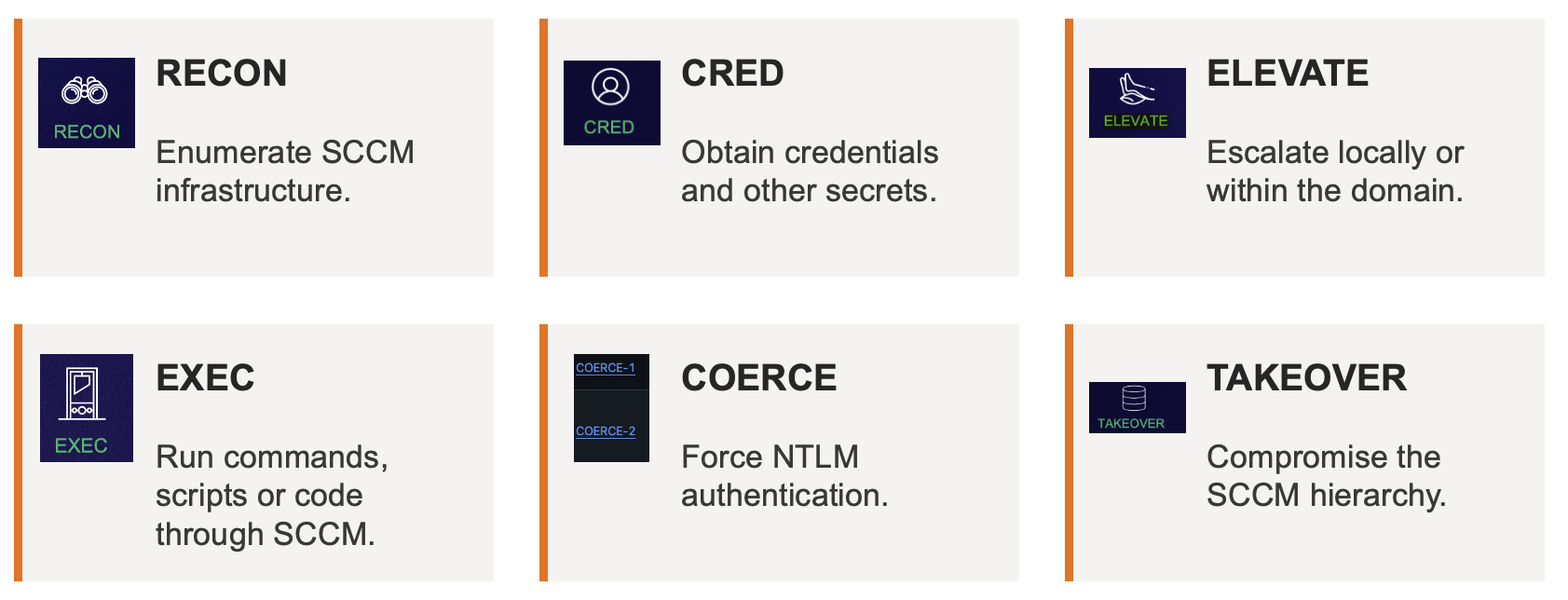
On the offensive side, techniques are grouped into six categories:
- RECON - Discover the SCCM infrastructure
- CRED - Obtain credentials and secrets
- ELEVATE – Escalate privileges locally or within the domain
- EXEC – Execute code through SCCM
- COERCE - Force NTLM (NT LAN Manager) authentication
- TAKEOVER - Take over the SCCM hierarchy
The defensive side has three categories:
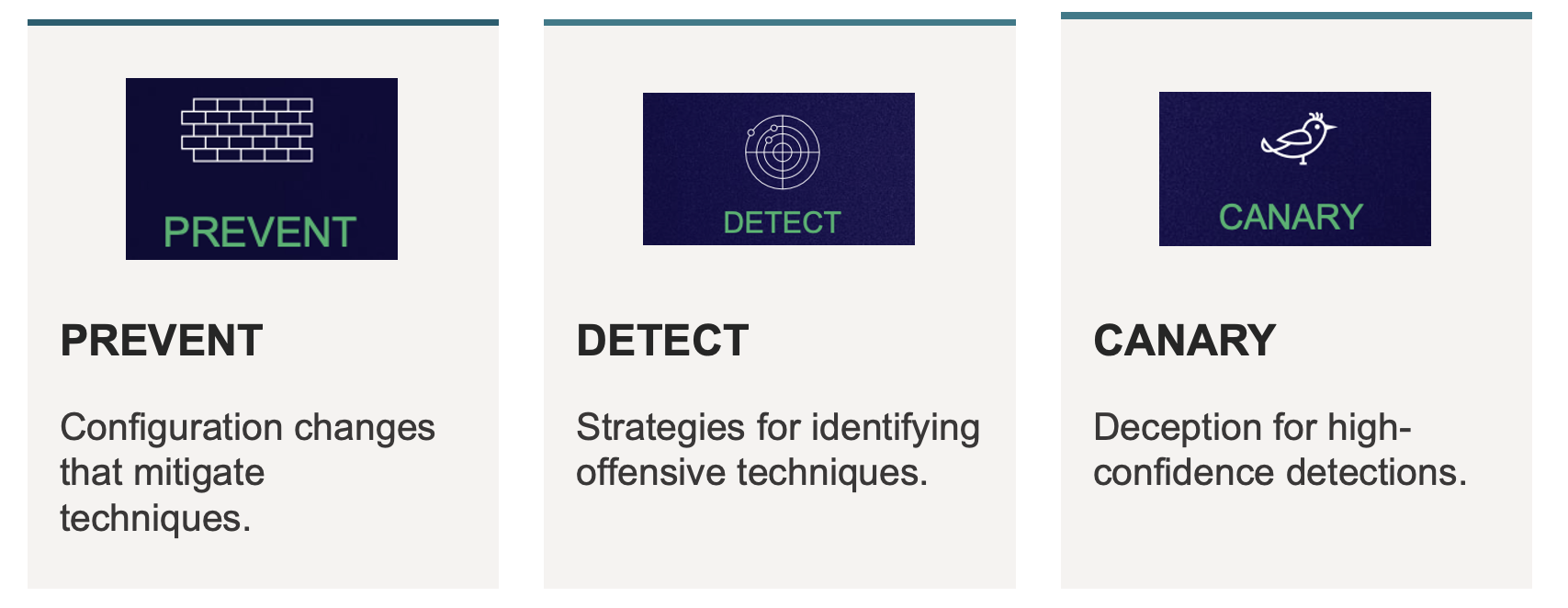
- PREVENT - Configuration changes that mitigate attack techniques
- DETECT - Strategies for detecting attack techniques
- CANARY - Deception strategies for creating high-confidence detections
You can read about the individual techniques in the links below, which contain tables of all attack and defence techniques documented so far. I recommend reading up on a few, depending on your goals and your role.
Systematically testing SCCM
In late 2025, once I had the Misconfiguration Manager taxonomy down, I started applying it systematically. Instead of trying various techniques and seeing what happened, we were able to more precisely select techniques based on the architecture and configuration of the environment. Since we had already worked through many of the attacks in our lab, we knew both the impact and how to operationalise them. That meant we could recon, triage and target the techniques we knew the inner workings of, and quickly rule out the ones that would not work in that environment.
The more SCCM-related weaknesses I found, the more I wondered how long they had been there. If SCCM was this exposed in every environment we tested now, it had probably been just as exposed for years. So, I went back through our old security test reports, all the way to 2018. It turned out we had been running into SCCM at mnemonic the whole time. For example, we had:
- Compromised SCCM service accounts with extremely high domain privileges.
- Found plaintext SCCM credentials in scripts, Group Policy, and configuration files scattered across file shares.
- Identified an SCCM site database backup on a distribution point file share.
- Mapped attack paths from SCCM accounts and groups to Domain Admin and other Tier 0 systems, meaning the most privileged tier in Active Directory.
These findings were eerily similar to what we were still seeing on tests in 2025 and 2026. The difference was what we did with them. For years, we had reported these findings as individual problems, often without mentioning SCCM at all, because we had no framework or taxonomy to connect them to. Not every penetration tester is able to investigate everything on every test, especially if it’s unfamiliar, and I think it is fair to admit that.
But once we had the Misconfiguration Manager system to connect these findings to, we started deliberately looking for SCCM on internal penetration tests, Red Team tests, TIBER tests, and Purple Team tests. This also made it easier to report and talk about the issues, since they were now clearly framed and could be referenced with a simple code like CRED-6.
Why SCCM creates high-impact attack paths
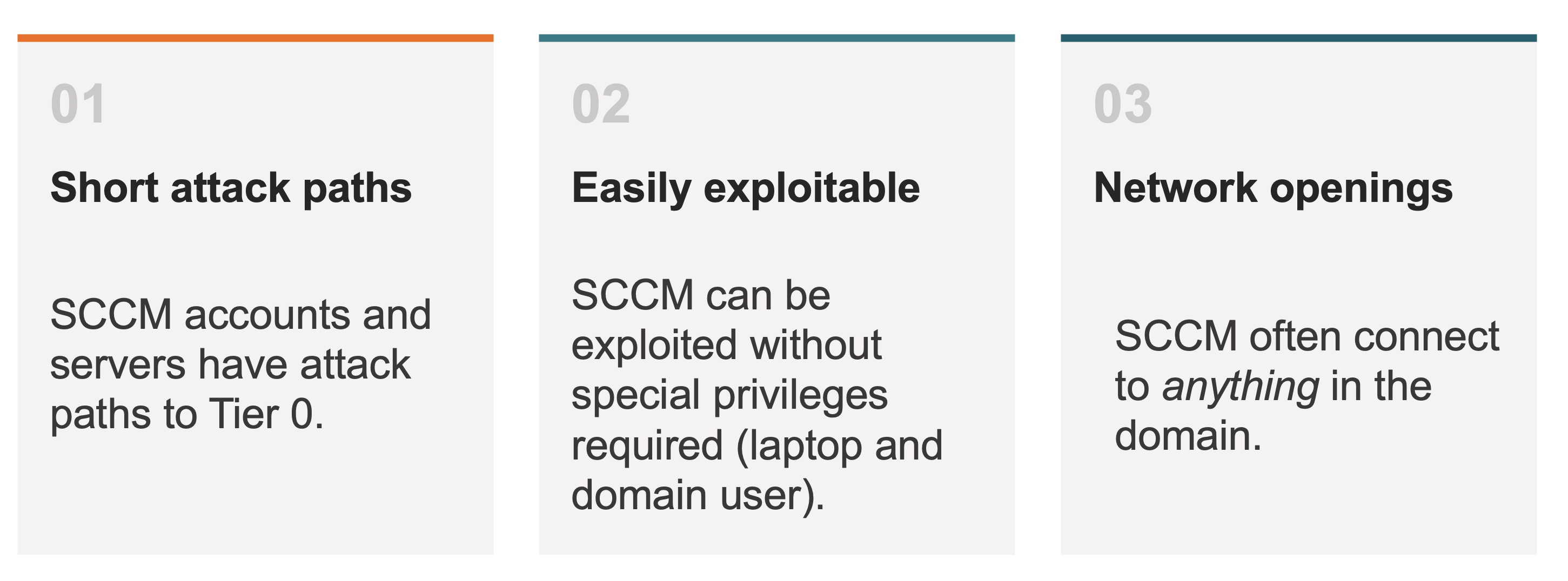
SCCM can act as a hub for threat actors, and I have identified three reasons why:
- Short attack paths to the systems and accounts a threat actor is after
- Easy exploitation, both from low privileges to high, and from access on one system to access on many
- Network openings to most of the IT infrastructure in the environment
Short attack paths to target systems and accounts
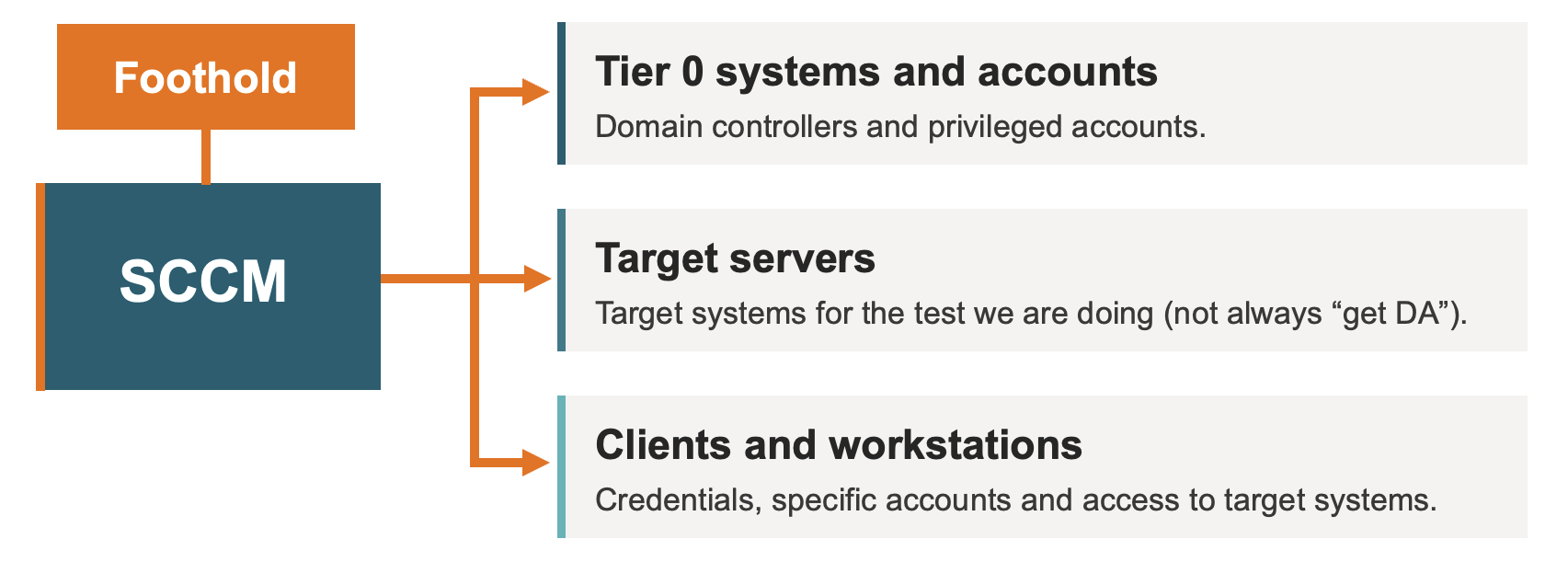
From an attack perspective, controlling SCCM gives us authenticated access, meaning both credentials and line-of-sight over the network, to:
- Tier 0 systems and accounts, like domain controllers and members of the Domain Admins group.
- Target servers, like a specific application or test target, which is not necessarily a Tier 0 system.
- Clients and workstations, like the laptop of someone with access to a target system.
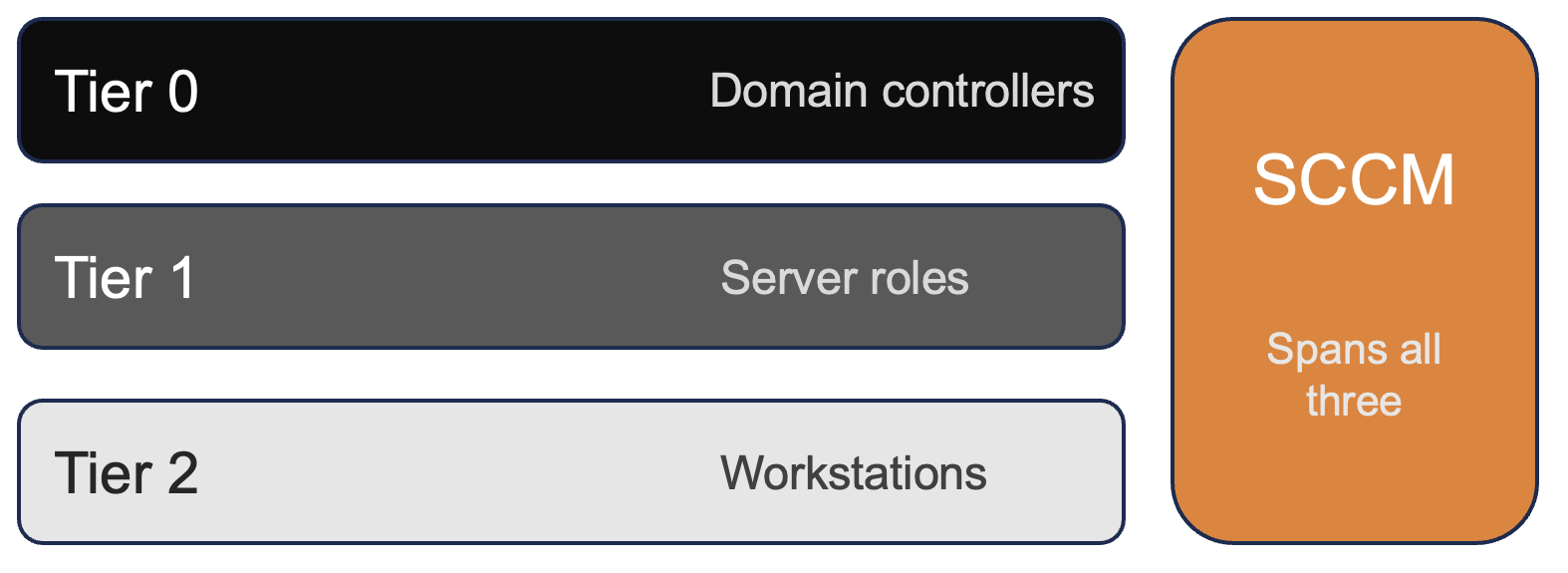
The reason those attack paths are so short is that SCCM spans all three tiers of the administrative tier model. This is the model that splits an environment into domain controllers (Tier 0), servers (Tier 1), and workstations (Tier 2), and prevents higher-tier credentials from being exposed in lower tiers. SCCM often manages not just workstations, but servers too, and in some configurations domain controllers and other Tier 0 systems.
A few times I have seen organisations deliberately keep domain controllers and other Tier 0 systems out of SCCM. That is the right call if the goal is to treat SCCM as a Tier 1 system. The problem is that the same organisations then use SCCM to manage the jump servers their administrators use to reach the domain controllers. A jump server that can log into a domain controller is really a Tier 0 system, but it has been classified as Tier 1, so SCCM is allowed to manage it. That is not SCCM's fault, but it is exactly how SCCM becomes a bridge into Tier 0.
On top of that, the SCCM administrators are often the same people as the Domain Admins. That is not a problem in itself, as long as SCCM is defined as Tier 0 and those admins only ever touch it with Tier 0 accounts from Tier 0 workstations. What we actually see is different: the administrators log into the SCCM console with their Domain Admin account from their normal, everyday workstation, or they RDP into the site server with it. Either way, a Tier 0 credential ends up on a lower-tier machine that SCCM manages. So SCCM becomes a hub to Tier 0 systems and Tier 0 accounts at the same time, and a threat actor who owns SCCM obtains both.
Easily exploitable
As of September 2026, Misconfiguration Manager documents 34 attack techniques. Eighteen of them need nothing more than a valid AD domain user, and three work with no credentials at all, just network access. Some of the highest-impact paths need no administrative privileges either, and many of these attacks lead to full SCCM site takeover. In our experience they work by default in most Active Directory environments, because the controls that would stop them are missing.
What strikes me every time we test SCCM is how quickly we go from ‘nothing’ to ‘everything’. We typically start our security tests from an ‘assumed breach’ position, often with only regular AD domain user privileges and control of a Windows computer. Only a few hours later, by attacking SCCM, we control the entire site and have full control of the Active Directory domain. Like I said to a colleague during one test, ‘this is like Kerberoasting all over again.’ SCCM gives us the same kind of silver bullet, taking us from almost no privileges to an extreme amount of control.
Line-of-sight to most of the IT infrastructure in the environment
In most organisations we test, SCCM acts as a hub with network openings on key protocols like SMB, going to and from both clients and servers. We often call that ‘line-of-sight’: a position on the network where we can actually reach our target systems and their services. This property makes SCCM an excellent network position for a threat actor to be in.
We have tested organisations with great network segmentation, where neither workstations nor servers we compromised could reach our target systems. Segmentation like that makes taking control of target systems much harder, even if we already have valid credentials. SCCM is usually exempted from segmentation, often by design, since it has to talk to servers as well as clients. From compromised site servers we have almost always been able to connect to clients over WMI, SMB and WinRM. We have also found openings from site servers to systems that are not clients at all, including the target systems for our tests.
In a test earlier this year, the goal was to obtain access to the organisation’s vCenter instance to prove that a threat actor could take control of all their IT infrastructure. After compromising the SCCM site server, we found it was one of very few systems in the environment with a network opening to HTTPS on the administrative VLAN where vCenter was hosted. An administrator’s PowerShell console history on the site server showed they had used this server to connect to vCenter from the CLI. Because we had used our position on the site server to compromise this administrator’s account, SCCM gave us both the credentials for vCenter and the network position to reach it.
Obtaining credentials through SCCM
In this section I'll demonstrate two attacks that show what the short attack paths and easy exploitation described earlier look like in practice.
Shoutout to Chris Thompson (mayyhem) at SpecterOps for their awesome SCCM lab used in all these demos!
Demo 1: Credentials on distribution point file shares (CRED-6)
In this technique, a threat actor obtains domain credentials and more from the file shares of SCCM distribution points and site servers.
- Access required: A regular domain user.
- What you obtain: Credentials for high-privilege SCCM accounts, sensitive backup files, and whatever else has been left on the file share.
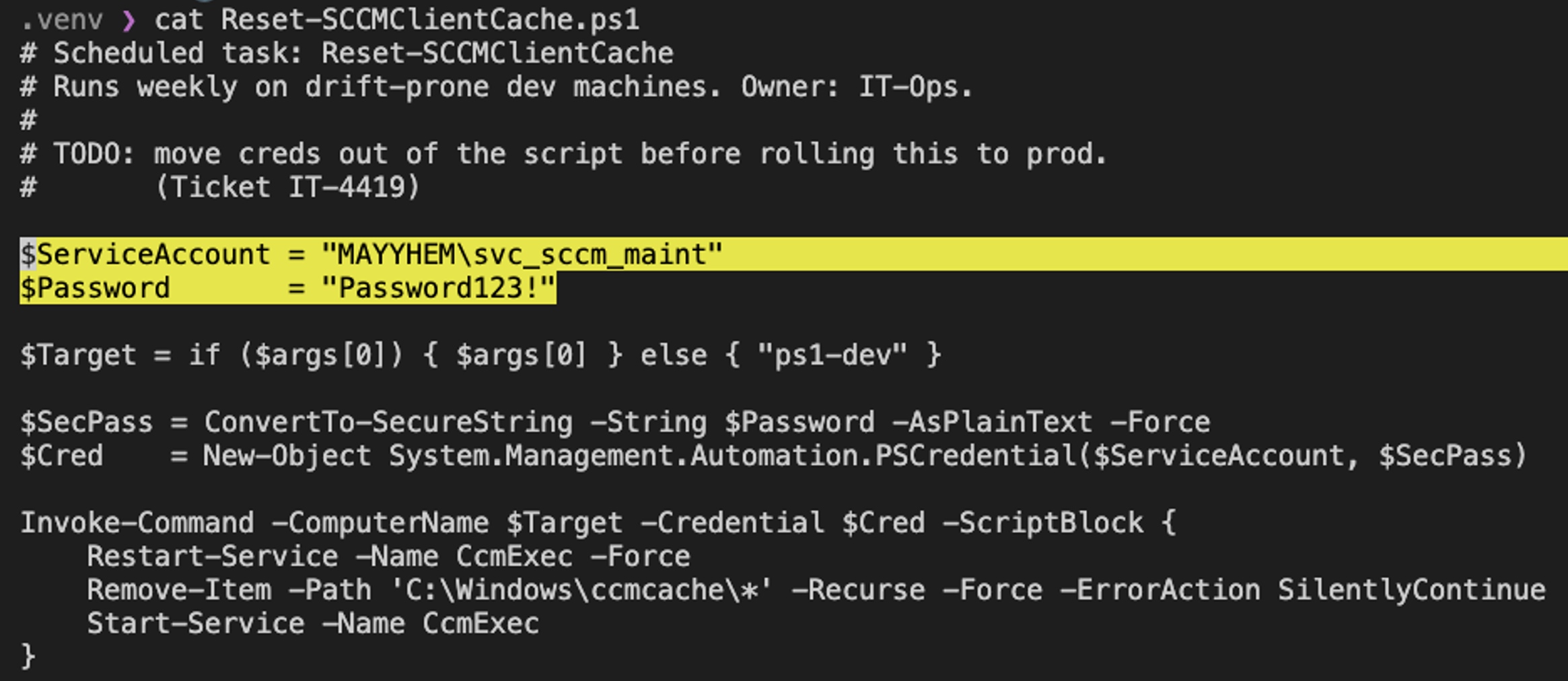
It takes almost no effort to execute this attack. In several tests we have found plaintext passwords in under five minutes, simply by identifying non-standard file shares on distribution points and having a nose for which file types to look in. You can nearly always do this from Windows Explorer on any domain-joined computer. It is not guaranteed you will find anything, but our experience is that we usually do.
The following are real examples of sensitive data we have found in non-standard shares:
- The plaintext password for an SCCM Administrator account in a PowerShell script
- The plaintext password for an SCCM Administrator account in files containing SCCM task sequence variables
- Backup files for a vCenter appliance
- Backup files for the entire SCCM site database
In some of our tests, credentials and files like these took us from a regular domain user to full control of every computer in the domain. This is the clearest example I have of the short, high-impact attack paths I described earlier.
Demo 2: Credentials from PXE boot (CRED-1)
This technique is a bit more involved than CRED-6, but it is still reasonably easy to execute, and it requires no authentication at all.
- Access required: Network access to the target service.
- What you obtain: Plaintext credentials for the network access account, domain join account, or other high-privilege SCCM accounts.
How PXE boot works
Most people who have not been system administrators in large IT environments will not have run into PXE boot, so here is a quick explanation.
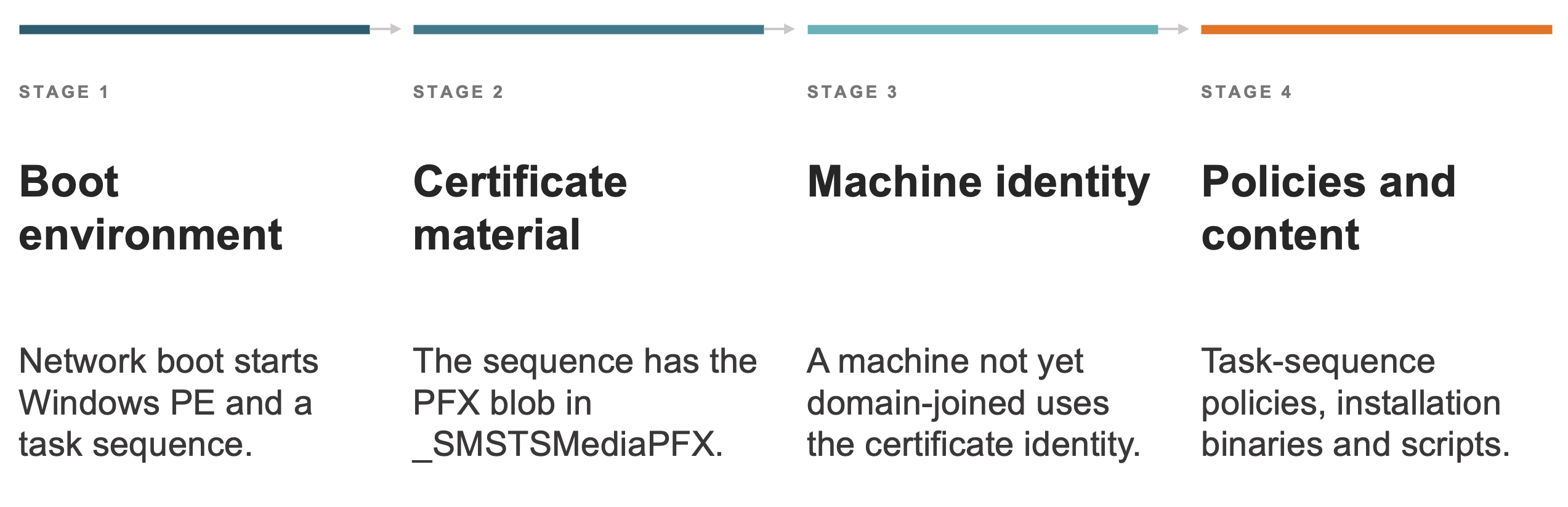
When a computer needs to be freshly imaged, a system administrator typically connects it by Ethernet cable to a designated boot point for re-imaging. After the computer is connected and the administrator selects ‘boot from PXE’, the following happens:
- The computer connects to the PXE boot environment, more often than not the SCCM distribution point. PXE uses DHCP ports and TFTP to download the binary files from the distribution point.
- Because the computer cannot authenticate itself yet, since it is not domain joined, the PXE boot point gives it a PFX certificate to authenticate over HTTPS.
- The computer uses that certificate to talk to the SCCM management point and retrieve policies and content.
- Policies and content often contain high-value credentials, like the network access account or the domain join account.
How attacks against PXE boot work
Penetration testing tools against PXE boot, like PXEThief, implement the same process, but without an actual computer. They auto-discover the PXE boot point, retrieve the certificate, download all task sequences, and parse the output for plaintext passwords.
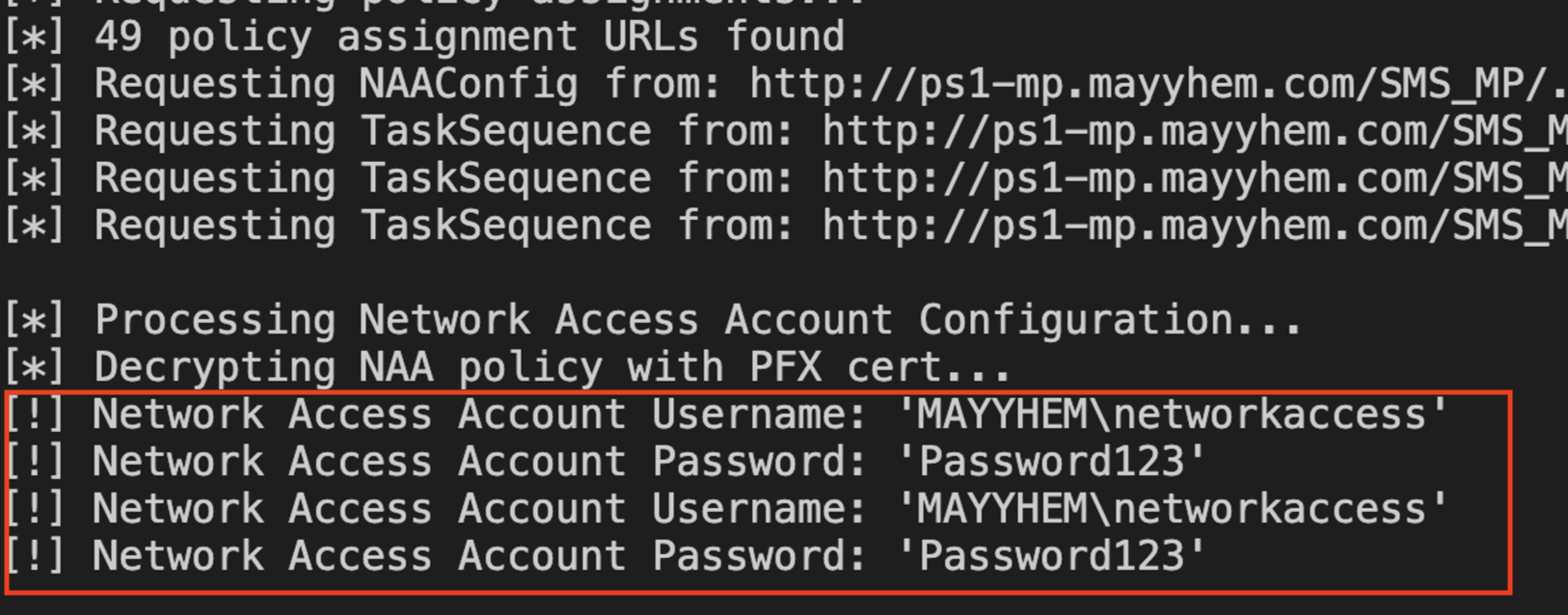
We have used this technique numerous times, and we have found credentials every single time, usually for the network access account and the domain join account. These accounts are commonly configured with control over servers, clients or domain objects. On a recent test we obtained an OSD (Operating System Deployment) account that was a member of a ‘server administrators’ group, which gave us control of every server in the environment. Remember, none of this requires credentials to begin with, so the result is often a privilege escalation from no access at all to full control of the domain.
Where to go from here
Start by checking where SCCM stores credentials, who can retrieve them and what access they provide. A deployment account with unnecessary privileges can turn an exposed password into a much wider compromise.
But removing exposed credentials does not close every attack path. In Part 2, we look at authentication relay attacks and the controls that can help prevent and detect SCCM compromise.
Questions about this blog post?

Want to learn more?
If you want to learn more about our Red Team and penetration testing offerings, please check out our Red Team page and Penetration Testing page, and contact us for an introduction. We also offer the SCCM workshop described above for clients, so get in touch if that sounds interesting to you.